Stay Ahead, Stay ONMINE

Practical SQL Puzzles That Will Level Up Your Skill

There are some Sql patterns that, once you know them, you start seeing them everywhere. The solutions to the puzzles that I will show you today are actually very simple SQL queries, but understanding the concept behind them will surely unlock new solutions to the queries you write on a day-to-day basis. These challenges are all based on real-world scenarios, as over the past few months I made a point of writing down every puzzle-like query that I had to build. I also encourage you to try them for yourself, so that you can challenge yourself first, which will improve your learning! All queries to generate the datasets will be provided in a PostgreSQL and DuckDB-friendly syntax, so that you can easily copy and play with them. At the end I will also provide you a link to a GitHub repo containing all the code, as well as the answer to the bonus challenge I will leave for you! I organized these puzzles in order of increasing difficulty, so, if you find the first ones too easy, at least take a look at the last one, which uses a technique that I truly believe you won’t have seen before. Okay, let’s get started. I love this puzzle because of how short and simple the final query is, even though it deals with many edge cases. The data for this challenge shows tickets moving in between Kanban stages, and the objective is to find how long, on average, tickets stay in the Doing stage. The data contains the ID of the ticket, the date the ticket was created, the date of the move, and the “from” and “to” stages of the move. The stages present are New, Doing, Review, and Done. Some things you need to know (edge cases): Tickets can move backwards, meaning tickets can go back to the Doing stage. You should not include tickets that are still stuck in the Doing stage, as there is no way to know how long they will stay there for. Tickets are not always created in the New stage. “`SQL CREATE TABLE ticket_moves ( ticket_id INT NOT NULL, create_date DATE NOT NULL, move_date DATE NOT NULL, from_stage TEXT NOT NULL, to_stage TEXT NOT NULL ); “` “`SQL INSERT INTO ticket_moves (ticket_id, create_date, move_date, from_stage, to_stage) VALUES — Ticket 1: Created in “New”, then moves to Doing, Review, Done. (1, ‘2024-09-01’, ‘2024-09-03’, ‘New’, ‘Doing’), (1, ‘2024-09-01’, ‘2024-09-07’, ‘Doing’, ‘Review’), (1, ‘2024-09-01’, ‘2024-09-10’, ‘Review’, ‘Done’), — Ticket 2: Created in “New”, then moves: New → Doing → Review → Doing again → Review. (2, ‘2024-09-05’, ‘2024-09-08’, ‘New’, ‘Doing’), (2, ‘2024-09-05’, ‘2024-09-12’, ‘Doing’, ‘Review’), (2, ‘2024-09-05’, ‘2024-09-15’, ‘Review’, ‘Doing’), (2, ‘2024-09-05’, ‘2024-09-20’, ‘Doing’, ‘Review’), — Ticket 3: Created in “New”, then moves to Doing. (Edge case: no subsequent move from Doing.) (3, ‘2024-09-10’, ‘2024-09-16’, ‘New’, ‘Doing’), — Ticket 4: Created already in “Doing”, then moves to Review. (4, ‘2024-09-15’, ‘2024-09-22’, ‘Doing’, ‘Review’); “` A summary of the data: Ticket 1: Created in the New stage, moves normally to Doing, then Review, and then Done. Ticket 2: Created in New, then moves: New → Doing → Review → Doing again → Review. Ticket 3: Created in New, moves to Doing, but it is still stuck there. Ticket 4: Created in the Doing stage, moves to Review afterward. It might be a good idea to stop for a bit and think how you would deal with this. Can you find out how long a ticket stays on a single stage? Honestly, this sounds intimidating at first, and it looks like it will be a nightmare to deal with all the edge cases. Let me show you the full solution to the problem, and then I will explain what is happening afterward. “`SQL WITH stage_intervals AS (     SELECT         ticket_id,         from_stage,         move_date          – COALESCE(             LAG(move_date) OVER (                 PARTITION BY ticket_id                  ORDER BY move_date             ),              create_date         ) AS days_in_stage     FROM         ticket_moves ) SELECT     SUM(days_in_stage) / COUNT(DISTINCT ticket_id) as avg_days_in_doing FROM     stage_intervals WHERE     from_stage = ‘Doing’; “` The first CTE uses the LAG function to find the previous move of the ticket, which will be the time the ticket entered that stage. Calculating the duration is as simple as subtracting the previous date from the move date. What you should notice is the use of the COALESCE in the previous move date. What that does is that if a ticket doesn’t have a previous move, then it uses the date of creation of the ticket. This takes care of the cases of tickets being created directly into the Doing stage, as it still will properly calculate the time it took to leave the stage. This is the result of the first CTE, showing the time spent in each stage. Notice how the Ticket 2 has two entries, as it visited the Doing stage in two separate occasions. With this done, it’s just a matter of getting the average as the SUM of total days spent in doing, divided by the distinct number of tickets that ever left the stage. Doing it this way, instead of simply using the AVG, makes sure that the two rows for Ticket 2 get properly accounted for as a single ticket. Not so bad, right? The goal of this second challenge is to find the most recent contract sequence of every employee. A break of sequence happens when two contracts have a gap of more than one day between them.  In this dataset, there are no contract overlaps, meaning that a contract for the same employee either has a gap or ends a day before the new one starts. “`SQL CREATE TABLE contracts (     contract_id integer PRIMARY KEY,     employee_id integer NOT NULL,     start_date date NOT NULL,     end_date date NOT NULL ); INSERT INTO contracts (contract_id, employee_id, start_date, end_date) VALUES      — Employee 1: Two continuous contracts     (1, 1, ‘2024-01-01’, ‘2024-03-31’),     (2, 1, ‘2024-04-01’, ‘2024-06-30’),     — Employee 2: One contract, then a gap of three days, then two contracts     (3, 2, ‘2024-01-01’, ‘2024-02-15’),     (4, 2, ‘2024-02-19’, ‘2024-04-30’),     (5, 2, ‘2024-05-01’, ‘2024-07-31’),     — Employee 3: One contract     (6, 3, ‘2024-03-01’, ‘2024-08-31’); “` As a summary of the data: Employee 1: Has two continuous contracts. Employee 2: One contract, then a gap of three days, then two contracts. Employee 3: One contract. The expected result, given the dataset, is that all contracts should be included except for the first contract of Employee 2, which is the only one that has a gap. Before explaining the logic behind the solution, I would like you to think about what operation can be used to join the contracts that belong to the same sequence. Focus only on the second row of data, what information do you need to know if this contract was a break or not? I hope it’s clear that this is the perfect situation for window functions, again. They are incredibly useful for solving problems like this, and understanding when to use them helps a lot in finding clean solutions to problems. First thing to do, then, is to get the end date of the previous contract for the same employee with the LAG function. Doing that, it’s simple to compare both dates and check if it was a break of sequence. “`SQL WITH ordered_contracts AS (     SELECT         *,         LAG(end_date) OVER (PARTITION BY employee_id ORDER BY start_date) AS previous_end_date     FROM         contracts ), gapped_contracts AS (     SELECT         *,         — Deals with the case of the first contract, which won’t have         — a previous end date. In this case, it’s still the start of a new         — sequence.         CASE WHEN previous_end_date IS NULL             OR previous_end_date < start_date – INTERVAL '1 day' THEN             1         ELSE             0         END AS is_new_sequence     FROM         ordered_contracts ) SELECT * FROM gapped_contracts ORDER BY employee_id ASC; “` An intuitive way to continue the query is to number the sequences of each employee. For example, an employee who has no gap, will always be on his first sequence, but an employee who had 5 breaks in contracts will be on his 5th sequence. Funnily enough, this is done by another window function. “`SQL — — Previous CTEs — sequences AS (     SELECT         *,         SUM(is_new_sequence) OVER (PARTITION BY employee_id ORDER BY start_date) AS sequence_id FROM     gapped_contracts ) SELECT * FROM sequences ORDER BY employee_id ASC; “` Notice how, for Employee 2, he starts his sequence #2 after the first gapped value. To finish this query, I grouped the data by employee, got the value of their most recent sequence, and then did an inner join with the sequences to keep only the most recent one. “`SQL — — Previous CTEs — max_sequence AS (     SELECT         employee_id,         MAX(sequence_id) AS max_sequence_id FROM     sequences GROUP BY     employee_id ), latest_contract_sequence AS (     SELECT         c.contract_id,         c.employee_id,         c.start_date,         c.end_date     FROM         sequences c         JOIN max_sequence m ON c.sequence_id = m.max_sequence_id             AND c.employee_id = m.employee_id         ORDER BY             c.employee_id,             c.start_date ) SELECT     * FROM     latest_contract_sequence; “` As expected, our final result is basically our starting query just with the first contract of Employee 2 missing!  Finally, the last puzzle — I’m glad you made it this far.  For me, this is the most mind-blowing one, as when I first encountered this problem I thought of a completely different solution that would be a mess to implement in SQL. For this puzzle, I’ve changed the context from what I had to deal with for my job, as I think it will make it easier to explain.  Imagine you’re a data analyst at an event venue, and you’re analyzing the talks scheduled for an upcoming event. You want to find the time of day where there will be the highest number of talks happening at the same time. This is what you should know about the schedules: Rooms are booked in increments of 30min, e.g. from 9h-10h30. The data is clean, there are no overbookings of meeting rooms. There can be back-to-back meetings in a single meeting room. Meeting schedule visualized (this is the actual data).  “`SQL CREATE TABLE meetings (     room TEXT NOT NULL,     start_time TIMESTAMP NOT NULL,     end_time TIMESTAMP NOT NULL ); INSERT INTO meetings (room, start_time, end_time) VALUES     — Room A meetings     ('Room A', '2024-10-01 09:00', '2024-10-01 10:00'),     ('Room A', '2024-10-01 10:00', '2024-10-01 11:00'),     ('Room A', '2024-10-01 11:00', '2024-10-01 12:00'),     — Room B meetings     ('Room B', '2024-10-01 09:30', '2024-10-01 11:30'),     — Room C meetings     ('Room C', '2024-10-01 09:00', '2024-10-01 10:00'),     ('Room C', '2024-10-01 11:30', '2024-10-01 12:00'); “` The way to solve this is using what is called a Sweep Line Algorithm, or also known as an event-based solution. This last name actually helps to understand what will be done, as the idea is that instead of dealing with intervals, which is what we have in the original data, we deal with events instead. To do this, we need to transform every row into two separate events. The first event will be the Start of the meeting, and the second event will be the End of the meeting. “`SQL WITH events AS (   — Create an event for the start of each meeting (+1)   SELECT      start_time AS event_time,      1 AS delta   FROM meetings   UNION ALL   — Create an event for the end of each meeting (-1)   SELECT     — Small trick to work with the back-to-back meetings (explained later)     end_time – interval '1 minute' as end_time,     -1 AS delta   FROM meetings ) SELECT * FROM events; “` Take the time to understand what is happening here. To create two events from a single row of data, we’re simply unioning the dataset on itself; the first half uses the start time as the timestamp, and the second part uses the end time. You might already notice the delta column created and see where this is going. When an event starts, we count it as +1, when it ends, we count it as -1. You might even be already thinking of another window function to solve this, and you’re actually right! But before that, let me just explain the trick I used in the end dates. As I don’t want back-to-back meetings to count as two concurrent meetings, I’m subtracting a single minute of every end date. This way, if a meeting ends and another starts at 10h30, it won’t be assumed that two meetings are concurrently happening at 10h30. Okay, back to the query and yet another window function. This time, though, the function of choice is a rolling SUM. “`SQL — — Previous CTEs — ordered_events AS (   SELECT     event_time,     delta,     SUM(delta) OVER (ORDER BY event_time, delta DESC) AS concurrent_meetings   FROM events ) SELECT * FROM ordered_events ORDER BY event_time DESC; “` The rolling SUM at the Delta column is essentially walking down every record and finding how many events are active at that time. For example, at 9 am sharp, it sees two events starting, so it marks the number of concurrent meetings as two! When the third meeting starts, the count goes up to three. But when it gets to 9h59 (10 am), then two meetings end, bringing the counter back to one. With this data, the only thing missing is to find when the highest value of concurrent meetings happens. “`SQL — — Previous CTEs — max_events AS (   — Find the maximum concurrent meetings value   SELECT      event_time,      concurrent_meetings,     RANK() OVER (ORDER BY concurrent_meetings DESC) AS rnk   FROM ordered_events ) SELECT event_time, concurrent_meetings FROM max_events WHERE rnk = 1; “` That’s it! The interval of 9h30–10h is the one with the largest number of concurrent meetings, which checks out with the schedule visualization above! This solution looks incredibly simple in my opinion, and it works for so many situations. Every time you are dealing with intervals now, you should think if the query wouldn’t be easier if you thought about it in the perspective of events. But before you move on, and to really nail down this concept, I want to leave you with a bonus challenge, which is also a common application of the Sweep Line Algorithm. I hope you give it a try! Bonus challenge The context for this one is still the same as the last puzzle, but now, instead of trying to find the period when there are most concurrent meetings, the objective is to find bad scheduling. It seems that there are overlaps in the meeting rooms, which need to be listed so it can be fixed ASAP. How would you find out if the same meeting room has two or more meetings booked at the same time? Here are some tips on how to solve it: It’s still the same algorithm. This means you will still do the UNION, but it will look slightly different. You should think in the perspective of each meeting room. You can use this data for the challenge: “`SQL CREATE TABLE meetings_overlap (     room TEXT NOT NULL,     start_time TIMESTAMP NOT NULL,     end_time TIMESTAMP NOT NULL ); INSERT INTO meetings_overlap (room, start_time, end_time) VALUES     — Room A meetings     ('Room A', '2024-10-01 09:00', '2024-10-01 10:00'),     ('Room A', '2024-10-01 10:00', '2024-10-01 11:00'),     ('Room A', '2024-10-01 11:00', '2024-10-01 12:00'),     — Room B meetings     ('Room B', '2024-10-01 09:30', '2024-10-01 11:30'),     — Room C meetings     ('Room C', '2024-10-01 09:00', '2024-10-01 10:00'),     — Overlaps with previous meeting.     ('Room C', '2024-10-01 09:30', '2024-10-01 12:00'); “` If you’re interested in the solution to this puzzle, as well as the rest of the queries, check this GitHub repo. The first takeaway from this blog post is that window functions are overpowered. Ever since I got more comfortable with using them, I feel that my queries have gotten so much simpler and easier to read, and I hope the same happens to you. If you’re interested in learning more about them, you would probably enjoy reading this other blog post I’ve written, where I go over how you can understand and use them effectively. The second takeaway is that these patterns used in the challenges really do happen in many other places. You might need to find sequences of subscriptions, customer retention, or you might need to find overlap of tasks. There are many situations when you will need to use window functions in a very similar fashion to what was done in the puzzles. The third thing I want you to remember is about this solution to using events besides dealing with intervals. I’ve looked at some problems I solved a long time ago that I could’ve used this pattern on to make my life easier, and unfortunately, I didn’t know about it at the time. I really do hope you enjoyed this post and gave a shot to the puzzles yourself. And I’m sure that if you made it this far, you either learned something new about SQL or strengthened your knowledge of window functions!  Thank you so much for reading. If you have questions or just want to get in touch with me, don’t hesitate to contact me at mtrentz.com. All images by the author unless stated otherwise.

There are some Sql patterns that, once you know them, you start seeing them everywhere. The solutions to the puzzles that I will show you today are actually very simple SQL queries, but understanding the concept behind them will surely unlock new solutions to the queries you write on a day-to-day basis.

These challenges are all based on real-world scenarios, as over the past few months I made a point of writing down every puzzle-like query that I had to build. I also encourage you to try them for yourself, so that you can challenge yourself first, which will improve your learning!

All queries to generate the datasets will be provided in a PostgreSQL and DuckDB-friendly syntax, so that you can easily copy and play with them. At the end I will also provide you a link to a GitHub repo containing all the code, as well as the answer to the bonus challenge I will leave for you!

I organized these puzzles in order of increasing difficulty, so, if you find the first ones too easy, at least take a look at the last one, which uses a technique that I truly believe you won’t have seen before.

Okay, let’s get started.

I love this puzzle because of how short and simple the final query is, even though it deals with many edge cases. The data for this challenge shows tickets moving in between Kanban stages, and the objective is to find how long, on average, tickets stay in the Doing stage.

The data contains the ID of the ticket, the date the ticket was created, the date of the move, and the “from” and “to” stages of the move. The stages present are New, Doing, Review, and Done.

Some things you need to know (edge cases):

  • Tickets can move backwards, meaning tickets can go back to the Doing stage.
  • You should not include tickets that are still stuck in the Doing stage, as there is no way to know how long they will stay there for.
  • Tickets are not always created in the New stage.
```SQL

CREATE TABLE ticket_moves (
    ticket_id INT NOT NULL,
    create_date DATE NOT NULL,
    move_date DATE NOT NULL,
    from_stage TEXT NOT NULL,
    to_stage TEXT NOT NULL
);

```
```SQL

INSERT INTO ticket_moves (ticket_id, create_date, move_date, from_stage, to_stage)
    VALUES
        -- Ticket 1: Created in "New", then moves to Doing, Review, Done.
        (1, '2024-09-01', '2024-09-03', 'New', 'Doing'),
        (1, '2024-09-01', '2024-09-07', 'Doing', 'Review'),
        (1, '2024-09-01', '2024-09-10', 'Review', 'Done'),
        -- Ticket 2: Created in "New", then moves: New → Doing → Review → Doing again → Review.
        (2, '2024-09-05', '2024-09-08', 'New', 'Doing'),
        (2, '2024-09-05', '2024-09-12', 'Doing', 'Review'),
        (2, '2024-09-05', '2024-09-15', 'Review', 'Doing'),
        (2, '2024-09-05', '2024-09-20', 'Doing', 'Review'),
        -- Ticket 3: Created in "New", then moves to Doing. (Edge case: no subsequent move from Doing.)
        (3, '2024-09-10', '2024-09-16', 'New', 'Doing'),
        -- Ticket 4: Created already in "Doing", then moves to Review.
        (4, '2024-09-15', '2024-09-22', 'Doing', 'Review');
```
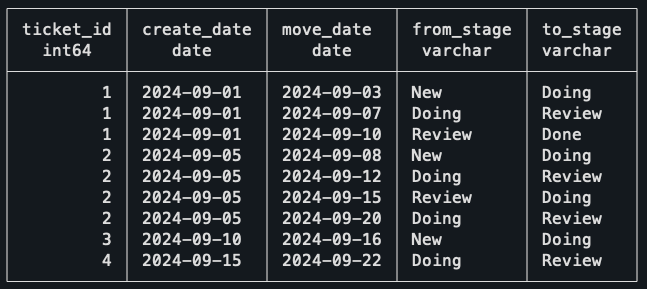
A summary of the data:

  • Ticket 1: Created in the New stage, moves normally to Doing, then Review, and then Done.
  • Ticket 2: Created in New, then moves: New → Doing → Review → Doing again → Review.
  • Ticket 3: Created in New, moves to Doing, but it is still stuck there.
  • Ticket 4: Created in the Doing stage, moves to Review afterward.

It might be a good idea to stop for a bit and think how you would deal with this. Can you find out how long a ticket stays on a single stage?

Honestly, this sounds intimidating at first, and it looks like it will be a nightmare to deal with all the edge cases. Let me show you the full solution to the problem, and then I will explain what is happening afterward.

```SQL

WITH stage_intervals AS (
    SELECT
        ticket_id,
        from_stage,
        move_date 
        - COALESCE(
            LAG(move_date) OVER (
                PARTITION BY ticket_id 
                ORDER BY move_date
            ), 
            create_date
        ) AS days_in_stage
    FROM
        ticket_moves
)
SELECT
    SUM(days_in_stage) / COUNT(DISTINCT ticket_id) as avg_days_in_doing
FROM
    stage_intervals
WHERE
    from_stage = 'Doing';
```
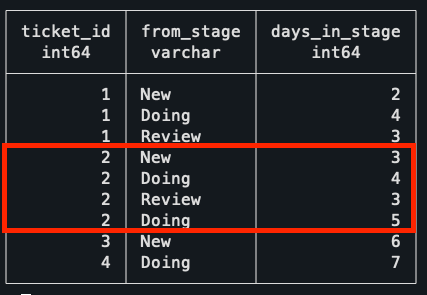
The first CTE uses the LAG function to find the previous move of the ticket, which will be the time the ticket entered that stage. Calculating the duration is as simple as subtracting the previous date from the move date.

What you should notice is the use of the COALESCE in the previous move date. What that does is that if a ticket doesn’t have a previous move, then it uses the date of creation of the ticket. This takes care of the cases of tickets being created directly into the Doing stage, as it still will properly calculate the time it took to leave the stage.

This is the result of the first CTE, showing the time spent in each stage. Notice how the Ticket 2 has two entries, as it visited the Doing stage in two separate occasions.
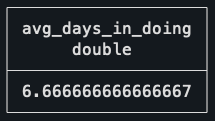
With this done, it’s just a matter of getting the average as the SUM of total days spent in doing, divided by the distinct number of tickets that ever left the stage. Doing it this way, instead of simply using the AVG, makes sure that the two rows for Ticket 2 get properly accounted for as a single ticket.

Not so bad, right?

The goal of this second challenge is to find the most recent contract sequence of every employee. A break of sequence happens when two contracts have a gap of more than one day between them. 

In this dataset, there are no contract overlaps, meaning that a contract for the same employee either has a gap or ends a day before the new one starts.

```SQL
CREATE TABLE contracts (
    contract_id integer PRIMARY KEY,
    employee_id integer NOT NULL,
    start_date date NOT NULL,
    end_date date NOT NULL
);

INSERT INTO contracts (contract_id, employee_id, start_date, end_date)
VALUES 
    -- Employee 1: Two continuous contracts
    (1, 1, '2024-01-01', '2024-03-31'),
    (2, 1, '2024-04-01', '2024-06-30'),
    -- Employee 2: One contract, then a gap of three days, then two contracts
    (3, 2, '2024-01-01', '2024-02-15'),
    (4, 2, '2024-02-19', '2024-04-30'),
    (5, 2, '2024-05-01', '2024-07-31'),
    -- Employee 3: One contract
    (6, 3, '2024-03-01', '2024-08-31');
```
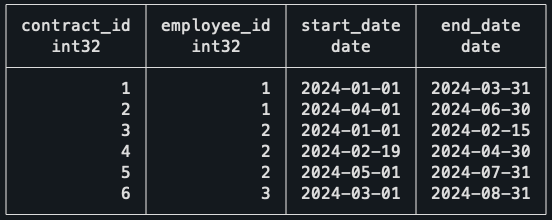
As a summary of the data:

  • Employee 1: Has two continuous contracts.
  • Employee 2: One contract, then a gap of three days, then two contracts.
  • Employee 3: One contract.

The expected result, given the dataset, is that all contracts should be included except for the first contract of Employee 2, which is the only one that has a gap.

Before explaining the logic behind the solution, I would like you to think about what operation can be used to join the contracts that belong to the same sequence. Focus only on the second row of data, what information do you need to know if this contract was a break or not?

I hope it’s clear that this is the perfect situation for window functions, again. They are incredibly useful for solving problems like this, and understanding when to use them helps a lot in finding clean solutions to problems.

First thing to do, then, is to get the end date of the previous contract for the same employee with the LAG function. Doing that, it’s simple to compare both dates and check if it was a break of sequence.

```SQL
WITH ordered_contracts AS (
    SELECT
        *,
        LAG(end_date) OVER (PARTITION BY employee_id ORDER BY start_date) AS previous_end_date
    FROM
        contracts
),
gapped_contracts AS (
    SELECT
        *,
        -- Deals with the case of the first contract, which won't have
        -- a previous end date. In this case, it's still the start of a new
        -- sequence.
        CASE WHEN previous_end_date IS NULL
            OR previous_end_date < start_date - INTERVAL '1 day' THEN
            1
        ELSE
            0
        END AS is_new_sequence
    FROM
        ordered_contracts
)
SELECT * FROM gapped_contracts ORDER BY employee_id ASC;
```
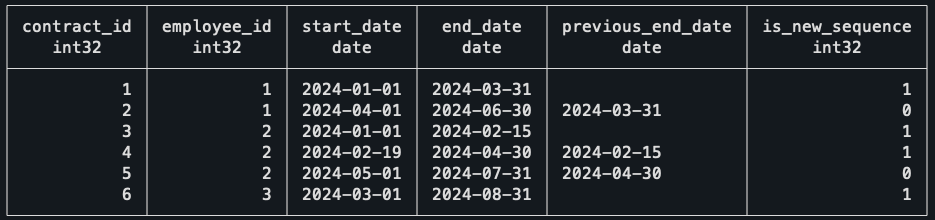
An intuitive way to continue the query is to number the sequences of each employee. For example, an employee who has no gap, will always be on his first sequence, but an employee who had 5 breaks in contracts will be on his 5th sequence. Funnily enough, this is done by another window function.

```SQL
--
-- Previous CTEs
--
sequences AS (
    SELECT
        *,
        SUM(is_new_sequence) OVER (PARTITION BY employee_id ORDER BY start_date) AS sequence_id
FROM
    gapped_contracts
)
SELECT * FROM sequences ORDER BY employee_id ASC;
```
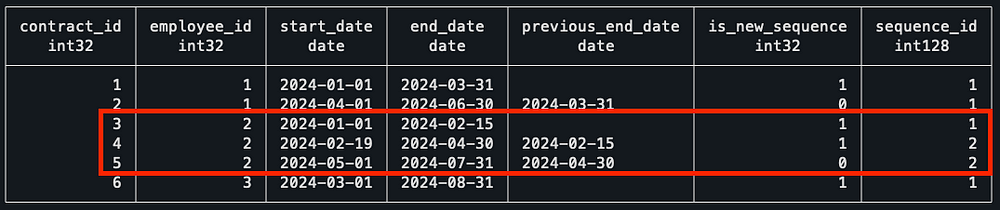
Notice how, for Employee 2, he starts his sequence #2 after the first gapped value. To finish this query, I grouped the data by employee, got the value of their most recent sequence, and then did an inner join with the sequences to keep only the most recent one.

```SQL
--
-- Previous CTEs
--
max_sequence AS (
    SELECT
        employee_id,
        MAX(sequence_id) AS max_sequence_id
FROM
    sequences
GROUP BY
    employee_id
),
latest_contract_sequence AS (
    SELECT
        c.contract_id,
        c.employee_id,
        c.start_date,
        c.end_date
    FROM
        sequences c
        JOIN max_sequence m ON c.sequence_id = m.max_sequence_id
            AND c.employee_id = m.employee_id
        ORDER BY
            c.employee_id,
            c.start_date
)
SELECT
    *
FROM
    latest_contract_sequence;
```

As expected, our final result is basically our starting query just with the first contract of Employee 2 missing! 

Finally, the last puzzle — I’m glad you made it this far. 

For me, this is the most mind-blowing one, as when I first encountered this problem I thought of a completely different solution that would be a mess to implement in SQL.

For this puzzle, I’ve changed the context from what I had to deal with for my job, as I think it will make it easier to explain. 

Imagine you’re a data analyst at an event venue, and you’re analyzing the talks scheduled for an upcoming event. You want to find the time of day where there will be the highest number of talks happening at the same time.

This is what you should know about the schedules:

  • Rooms are booked in increments of 30min, e.g. from 9h-10h30.
  • The data is clean, there are no overbookings of meeting rooms.
  • There can be back-to-back meetings in a single meeting room.

Meeting schedule visualized (this is the actual data). 

```SQL
CREATE TABLE meetings (
    room TEXT NOT NULL,
    start_time TIMESTAMP NOT NULL,
    end_time TIMESTAMP NOT NULL
);

INSERT INTO meetings (room, start_time, end_time) VALUES
    -- Room A meetings
    ('Room A', '2024-10-01 09:00', '2024-10-01 10:00'),
    ('Room A', '2024-10-01 10:00', '2024-10-01 11:00'),
    ('Room A', '2024-10-01 11:00', '2024-10-01 12:00'),
    -- Room B meetings
    ('Room B', '2024-10-01 09:30', '2024-10-01 11:30'),
    -- Room C meetings
    ('Room C', '2024-10-01 09:00', '2024-10-01 10:00'),
    ('Room C', '2024-10-01 11:30', '2024-10-01 12:00');
```
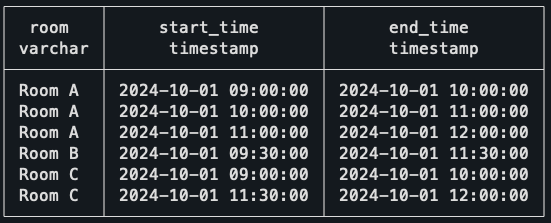
The way to solve this is using what is called a Sweep Line Algorithm, or also known as an event-based solution. This last name actually helps to understand what will be done, as the idea is that instead of dealing with intervals, which is what we have in the original data, we deal with events instead.

To do this, we need to transform every row into two separate events. The first event will be the Start of the meeting, and the second event will be the End of the meeting.

```SQL
WITH events AS (
  -- Create an event for the start of each meeting (+1)
  SELECT 
    start_time AS event_time, 
    1 AS delta
  FROM meetings
  UNION ALL
  -- Create an event for the end of each meeting (-1)
  SELECT 
   -- Small trick to work with the back-to-back meetings (explained later)
    end_time - interval '1 minute' as end_time,
    -1 AS delta
  FROM meetings
)
SELECT * FROM events;
```
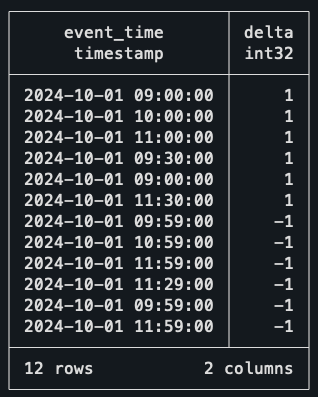
Take the time to understand what is happening here. To create two events from a single row of data, we’re simply unioning the dataset on itself; the first half uses the start time as the timestamp, and the second part uses the end time.

You might already notice the delta column created and see where this is going. When an event starts, we count it as +1, when it ends, we count it as -1. You might even be already thinking of another window function to solve this, and you’re actually right!

But before that, let me just explain the trick I used in the end dates. As I don’t want back-to-back meetings to count as two concurrent meetings, I’m subtracting a single minute of every end date. This way, if a meeting ends and another starts at 10h30, it won’t be assumed that two meetings are concurrently happening at 10h30.

Okay, back to the query and yet another window function. This time, though, the function of choice is a rolling SUM.

```SQL
--
-- Previous CTEs
--
ordered_events AS (
  SELECT
    event_time,
    delta,
    SUM(delta) OVER (ORDER BY event_time, delta DESC) AS concurrent_meetings
  FROM events
)
SELECT * FROM ordered_events ORDER BY event_time DESC;
```
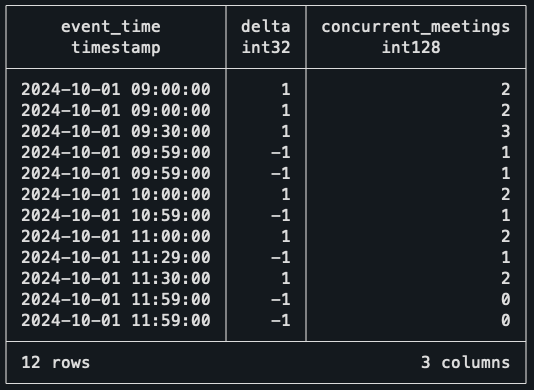
The rolling SUM at the Delta column is essentially walking down every record and finding how many events are active at that time. For example, at 9 am sharp, it sees two events starting, so it marks the number of concurrent meetings as two!

When the third meeting starts, the count goes up to three. But when it gets to 9h59 (10 am), then two meetings end, bringing the counter back to one. With this data, the only thing missing is to find when the highest value of concurrent meetings happens.

```SQL
--
-- Previous CTEs
--
max_events AS (
  -- Find the maximum concurrent meetings value
  SELECT 
    event_time, 
    concurrent_meetings,
    RANK() OVER (ORDER BY concurrent_meetings DESC) AS rnk
  FROM ordered_events
)
SELECT event_time, concurrent_meetings
FROM max_events
WHERE rnk = 1;
```
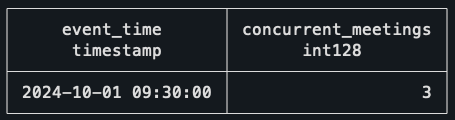
That’s it! The interval of 9h30–10h is the one with the largest number of concurrent meetings, which checks out with the schedule visualization above!

This solution looks incredibly simple in my opinion, and it works for so many situations. Every time you are dealing with intervals now, you should think if the query wouldn’t be easier if you thought about it in the perspective of events.

But before you move on, and to really nail down this concept, I want to leave you with a bonus challenge, which is also a common application of the Sweep Line Algorithm. I hope you give it a try!

Bonus challenge

The context for this one is still the same as the last puzzle, but now, instead of trying to find the period when there are most concurrent meetings, the objective is to find bad scheduling. It seems that there are overlaps in the meeting rooms, which need to be listed so it can be fixed ASAP.

How would you find out if the same meeting room has two or more meetings booked at the same time? Here are some tips on how to solve it:

  • It’s still the same algorithm.
  • This means you will still do the UNION, but it will look slightly different.
  • You should think in the perspective of each meeting room.

You can use this data for the challenge:

```SQL
CREATE TABLE meetings_overlap (
    room TEXT NOT NULL,
    start_time TIMESTAMP NOT NULL,
    end_time TIMESTAMP NOT NULL
);

INSERT INTO meetings_overlap (room, start_time, end_time) VALUES
    -- Room A meetings
    ('Room A', '2024-10-01 09:00', '2024-10-01 10:00'),
    ('Room A', '2024-10-01 10:00', '2024-10-01 11:00'),
    ('Room A', '2024-10-01 11:00', '2024-10-01 12:00'),
    -- Room B meetings
    ('Room B', '2024-10-01 09:30', '2024-10-01 11:30'),
    -- Room C meetings
    ('Room C', '2024-10-01 09:00', '2024-10-01 10:00'),
    -- Overlaps with previous meeting.
    ('Room C', '2024-10-01 09:30', '2024-10-01 12:00');
```

If you’re interested in the solution to this puzzle, as well as the rest of the queries, check this GitHub repo.

The first takeaway from this blog post is that window functions are overpowered. Ever since I got more comfortable with using them, I feel that my queries have gotten so much simpler and easier to read, and I hope the same happens to you.

If you’re interested in learning more about them, you would probably enjoy reading this other blog post I’ve written, where I go over how you can understand and use them effectively.

The second takeaway is that these patterns used in the challenges really do happen in many other places. You might need to find sequences of subscriptions, customer retention, or you might need to find overlap of tasks. There are many situations when you will need to use window functions in a very similar fashion to what was done in the puzzles.

The third thing I want you to remember is about this solution to using events besides dealing with intervals. I’ve looked at some problems I solved a long time ago that I could’ve used this pattern on to make my life easier, and unfortunately, I didn’t know about it at the time.


I really do hope you enjoyed this post and gave a shot to the puzzles yourself. And I’m sure that if you made it this far, you either learned something new about SQL or strengthened your knowledge of window functions! 

Thank you so much for reading. If you have questions or just want to get in touch with me, don’t hesitate to contact me at mtrentz.com.

All images by the author unless stated otherwise.

Shape
Shape
Stay Ahead

Explore More Insights

Stay ahead with more perspectives on cutting-edge power, infrastructure, energy,  bitcoin and AI solutions. Explore these articles to uncover strategies and insights shaping the future of industries.

Shape

AMD unveils AI GPU to challenge Nvidia’s Rubin

With up to 40 PFLOPS of FP4 performance and 20 PFLOPS of FP8 compute, the Instinct 455X roughly doubles the AI compute capability of the current Instinct MI350 generation. It also massively increases HBM memory bandwidth from roughly 8 TB/s on MI350 to more than 23 TB/s on the new

Read More »

Cato Networks launches agentic threat prevention

“Cato Agentic Threat Prevention starts from the premise that preventing AI-assisted attacks requires more than isolated alerts,” said Brian Anderson, global field CTO at Cato Networks, in an interview with Network World. “It uses Cato’s unified network and security context to build an understanding of each customer environment, including users

Read More »

Vista seeks RIGI approval for $5.8 billion Bandurria Norte development

Vista Energy SAB de CV has applied to include its Bandurria Norte shale oil development in Argentina’s Large Investment Incentive Regime (RIGI). The $5.8-billion project targets peak production of 50,000 boe/d. Bandurria Norte is the largest oil project submitted under RIGI, which provides tax, customs, and foreign-exchange incentives for qualifying investments, and follows approval of Pampa Energía SA’s $4.521 billion Rincón de Aranda development, which established the first framework for qualifying incremental shale oil production under the regime. Together, the projects represent more than $10.3 billion in planned investment and would extend RIGI-backed development into undeveloped Vaca Muerta oil acreage. Bandurria Norte spans 26,500 acres in Vaca Muerta’s oil window and currently has no producing wells. Vista plans to drill and complete 332 horizontal wells and build dedicated infrastructure, including a 40,000-b/d oil treatment plant, a gas compression plant, gathering systems, pipelines, and associated infrastructure. The project would be Vista’s first large-scale development outside its core Bajada del Palo hub, where existing roads, processing capacity, and gathering networks support lower-cost drilling. Bandurria Norte requires full greenfield development, increasing upfront capital requirements, and execution risk. Vista said RIGI incentives are material to developing its undeveloped acreage because incremental production from new areas can qualify separately from existing output if volumes remain physically and operationally traceable. Export capacity remains critical Bandurria Norte forms part of Vista’s plan to increase production to 208,000 boe/d in 2028 and 250,000 boe/d in 2030. Development depends on additional crude transportation capacity from the Neuquén basin, particularly the Vaca Muerta Oil Sur (VMOS) pipeline under construction between Allen and Punta Colorada in Río Negro province. Designed for an initial capacity of 550,000 b/d and expandable to 700,000 b/d, VMOS is scheduled for start-up in first-half 2027. Vista averaged 156,000 boe/d of production in second-quarter 2026, up 16%

Read More »

Oil prices surge on renewed Middle East tensions

@import url(‘https://fonts.googleapis.com/css2?family=Inter:wght@100..900&display=swap’); .ebm-page__main h1, .ebm-page__main h2, .ebm-page__main h3, .ebm-page__main h4, .ebm-page__main h5, .ebm-page__main h6 { font-family: Inter; } body { line-height: 150%; letter-spacing: 0.025em; } button, .ebm-button-wrapper { font-family: Inter; } .label-style { text-transform: uppercase; color: var(–color-grey); font-weight: 600; font-size: 0.75rem; } .caption-style { font-size: 0.75rem; opacity: .6; } #onetrust-pc-sdk [id*=btn-handler], #onetrust-pc-sdk [class*=btn-handler] { background-color: #c19a06 !important; border-color: #c19a06 !important; } #onetrust-policy a, #onetrust-pc-sdk a, #ot-pc-content a { color: #c19a06 !important; } #onetrust-consent-sdk #onetrust-pc-sdk .ot-active-menu { border-color: #c19a06 !important; } #onetrust-consent-sdk #onetrust-accept-btn-handler, #onetrust-banner-sdk #onetrust-reject-all-handler, #onetrust-consent-sdk #onetrust-pc-btn-handler.cookie-setting-link { background-color: #c19a06 !important; border-color: #c19a06 !important; } #onetrust-consent-sdk .onetrust-pc-btn-handler { color: #c19a06 !important; border-color: #c19a06 !important; } Global oil prices rallied sharply July 29 as renewed military escalation in the Middle East ended several days of relative calm and revived concerns over crude flows from the region. Brent crude surged 7% to above $90/bbl, while US WTI climbed above $84/bbl. The rally followed joint US-Saudi airstrikes on Iran-backed militias in Iraq—which killed at least 20 fighters, according to Iraq’s Popular Mobilization Forces—and a retaliatory Iranian missile barrage targeting US forces in the region. Stay updated on oil price volatility, shipping disruptions, LNG market analysis, and production output through OGJ’s Iran war content hub. This operation marks the first time Saudi Arabia has publicly acknowledged a combat role in the conflict. Washington and Riyadh stated that the strikes were launched in response to drone attacks on oil facilities in Saudi Arabia’s Eastern Province—attacks that originated from within Iraq. The sudden escalation across multiple fronts has raised concerns that the 5-month-old conflict could expand further, threatening critical shipping lanes—the Strait of Hormuz and, following the Houthis’ declared blockade of Saudi shipping, the Bab el-Mandeb strait. Adding support to prices, US commercial crude inventories fell by 7.2 million bbl in the week ended July 24, according

Read More »

Türkiye signs partnership deal with bp for Kirkuk oil field redevelopment

bp plc has farmed out a 15% interest in BP Energy Co. of Kirkuk Ltd. (BP ECKL) to state-owned Turkish Petroleum Corp. (TPAO), expanding on a partnership to support the redevelopment of major oil and gas fields in the Kirkuk region of northern Iraq. The move comes as Iraq aims to increase oil and gas production through various international partnerships. Signed during the official visit of Iraqi Prime Minister Ali Al-Zaidi to Türkiye, the agreement builds on a strategic cooperation memorandum of understanding (MoU) signed by the companies in February 2026.  The development and production contract covers an initial phase of oil and gas production of more than 3 billion boe from the Baba and Avanah domes of Kirkuk oil field and the adjacent Bai Hassan, Jambur, and Khabbaz fields in Federal Iraq, all currently operated by the North Oil Co. (NOC) and North Gas Co. (NGC), bp said in a release July 28. The contract area holds potential for additional exploration, the companies said. The deal follows one that saw ConocoPhillips acquire a 42% interest in BP ECKL. Together, bp said, the transactions support the next phase of redevelopment in Kirkuk. Türkiye Energy and Natural Resources Minister Bayraktar said the agreement is a step “towards making Turkish Petroleum a company that produces 1 million barrels of oil and natural gas per day.” Following completion of the transaction, which is subject to regulatory approvals, bp will remain the majority shareholder and a key participant in BP ECKL (bp 43%, ConocoPhillips 42%, TPAO 15%).

Read More »

EIA: US crude oil inventories down 7.2 million bbl

US crude oil inventories for the week ended July 24, excluding the Strategic Petroleum Reserve, decreased by 7.2 million bbl from the previous week, according to data from the US Energy Information Administration (EIA). At 404.5 million bbl, US crude oil inventories are about 7% below the 5-year average for this time of year, the EIA report indicated. EIA said total motor gasoline inventories increased slightly from last week and are 6% below the 5-year average for this time of year. Finished gasoline inventories increased while blending components inventories decreased last week. Distillate fuel inventories increased by 1.1 million bbl last week and are about 9% below the 5-year average for this time of year. Propane-propylene inventories increased by 2.5 million bbl from last week and are 34% above the 5-year average for this time of year, EIA said. US crude oil refinery inputs averaged 17.3 million b/d for the week ended July 24, which was 271,000 b/d more than the previous week’s average. Refineries operated at 97.2% of capacity. Gasoline production increased, averaging 9.9 million b/d. Distillate fuel production increased, averaging 5.4 million b/d. US crude oil imports averaged 5.7 million b/d, down 124,000 b/d from the previous week. Over the last 4 weeks, crude oil imports averaged about 5.7 million b/d, 6.9% less than the same 4-week period last year. Total motor gasoline imports averaged 659,000 b/d. Distillate fuel imports averaged 98,000 b/d.

Read More »

Cosmo lets well engineering contract for Block 4 offshore Abu Dhabi

@import url(‘https://fonts.googleapis.com/css2?family=Inter:wght@100..900&display=swap’); .ebm-page__main h1, .ebm-page__main h2, .ebm-page__main h3, .ebm-page__main h4, .ebm-page__main h5, .ebm-page__main h6 { font-family: Inter; } body { line-height: 150%; letter-spacing: 0.025em; } button, .ebm-button-wrapper { font-family: Inter; } .label-style { text-transform: uppercase; color: var(–color-grey); font-weight: 600; font-size: 0.75rem; } .caption-style { font-size: 0.75rem; opacity: .6; } #onetrust-pc-sdk [id*=btn-handler], #onetrust-pc-sdk [class*=btn-handler] { background-color: #c19a06 !important; border-color: #c19a06 !important; } #onetrust-policy a, #onetrust-pc-sdk a, #ot-pc-content a { color: #c19a06 !important; } #onetrust-consent-sdk #onetrust-pc-sdk .ot-active-menu { border-color: #c19a06 !important; } #onetrust-consent-sdk #onetrust-accept-btn-handler, #onetrust-banner-sdk #onetrust-reject-all-handler, #onetrust-consent-sdk #onetrust-pc-btn-handler.cookie-setting-link { background-color: #c19a06 !important; border-color: #c19a06 !important; } #onetrust-consent-sdk .onetrust-pc-btn-handler { color: #c19a06 !important; border-color: #c19a06 !important; } Cosmo E&P Albahriya Ltd. has let a well engineering services contract to CB&I’s Asset Solutions (formerly part of Petrofac) for Block 4 offshore north of Abu Dhabi, UAE. Offshore Block 4 covers an area of 4,865 sq km in the shallow waters of the Arabian Gulf. Cosmo was awarded the block in Abu Dhabi’s second Block Bid Round in 2021 and is operator of the block (100%). Since then, operations in the area have focused on oil exploration.

Read More »

Repsol farms out 50% stake in deepwater Gulf of Mexico block to Talos Energy

@import url(‘https://fonts.googleapis.com/css2?family=Inter:wght@100..900&display=swap’); .ebm-page__main h1, .ebm-page__main h2, .ebm-page__main h3, .ebm-page__main h4, .ebm-page__main h5, .ebm-page__main h6 { font-family: Inter; } body { line-height: 150%; letter-spacing: 0.025em; } button, .ebm-button-wrapper { font-family: Inter; } .label-style { text-transform: uppercase; color: var(–color-grey); font-weight: 600; font-size: 0.75rem; } .caption-style { font-size: 0.75rem; opacity: .6; } #onetrust-pc-sdk [id*=btn-handler], #onetrust-pc-sdk [class*=btn-handler] { background-color: #c19a06 !important; border-color: #c19a06 !important; } #onetrust-policy a, #onetrust-pc-sdk a, #ot-pc-content a { color: #c19a06 !important; } #onetrust-consent-sdk #onetrust-pc-sdk .ot-active-menu { border-color: #c19a06 !important; } #onetrust-consent-sdk #onetrust-accept-btn-handler, #onetrust-banner-sdk #onetrust-reject-all-handler, #onetrust-consent-sdk #onetrust-pc-btn-handler.cookie-setting-link { background-color: #c19a06 !important; border-color: #c19a06 !important; } #onetrust-consent-sdk .onetrust-pc-btn-handler { color: #c19a06 !important; border-color: #c19a06 !important; } Repsol SA will farm out a 50% working interest to Talos Energy Inc. in Block 29 in the Salinas-Sureste basin, offshore Mexico. Under the agreement, Talos Energy will make a contingent $30-million payment at final investment decision (FID), Talos said in a July 27 release. Terms also include a cash-carry of up to $20 million on the next exploration well and reimbursement of certain pre-closing costs, subject to customary terms and conditions, including Mexico’s regulatory approvals. Upon closing, Repsol will remain operator and retain a 50% interest alongside Talos’ 50% working interest.  The companies anticipate advancing the project toward FID in 2027. Block 29 development Block 29 contains the Polok and Chinwol oil discoveries, estimated to hold more than 200 MMboe of gross recoverable resources. Oil was discovered by the Polok-1 and Chinwol-1 wells, which encountered net oil columns of more than 200 m and 150 m, respectively. <!–> –><!–> –> May 5, 2020 <!–> –><!–> –> Feb. 8, 2023 <!–> –><!–> –> Dec. 3, 2024 The 3,254-sq-km block lies about 88 km offshore Tabasco. Polok and Chinwol fields are about 16 km apart in water depths of 460-600 m. The potential development concept centers on

Read More »

Nvidia’s Next Move? Financing AI

The report argues that AI infrastructure spending is on track to exceed $2 trillion annually by 2028, with cumulative investment reaching roughly $11.1 trillion between 2024 and 2029. Financing those projects will require a massive expansion of credit markets, which could result in a cumulative collective AI-related debt of $7 trillion by the end of the decade. With deals reaching into the multibillion-dollar range, banks and venture funds simply don’t have that kind of money. Enter Nvidia. As of the first fiscal quarter of 2027 ended April 26, 2026, Nvidia was sitting on roughly $80.5 billion in cash, cash equivalents, and short-term investments. After data center capacity constrained AI expansion in 2025 and chip supply became the limiting factor in early 2026, financing has emerged as the next major obstacle to scaling AI infrastructure. “It is clear that financing will now be one of the most significant obstacles to ramping large-scale compute broadly available to everyone,” the authors wrote.

Read More »

The Gigawatt Buildout Faces the Execution Test

Demand remains abundant across the data center and AI infrastructure market. Alphabet has raised its capital spending forecast again. OpenAI has unveiled a 3.2-gigawatt project in Georgia. Hut 8 has signed another multibillion-dollar lease in Texas, while BlackRock and its partners have acquired Aligned Data Centers for approximately $40 billion. Oracle, meanwhile, could face a $7 billion collateral requirement in Wisconsin, Meta is paying more to finance a $12 billion Texas project, and proposed developments are drawing resistance across North America and beyond. Together, these developments describe a market moving into a more demanding phase. Land, power and capital remain available, but not on the same terms everywhere. The projects most likely to move are those that combine a credible customer, a durable power path, institutional financing and a development strategy capable of surviving public scrutiny. Hyperscaler Spending Keeps Rising After Google Cloud revenue grew 82% year over year to $24.8 billion in the second quarter, Alphabet increased its expected 2026 capital expenditures to between $195 billion and $205 billion. That was $15 billion above its previous forecast and more than twice the $91.5 billion the company spent in 2025. The cloud growth explains the spending without removing its financial pressure. The largest platforms are committing unprecedented cash to facilities, chips, networks and power systems whose economics will be measured over many years. OpenAI’s Project Camellia in Effingham County, Georgia, extends the scale further. OpenAI says it is designing and developing the campus itself and has contracted with Georgia Power for 3.2 GW to be delivered in phases from 2028 through 2032. Local reporting places the initial investment at at least $20 billion across roughly 1,400 acres. The 25-year power supply agreement may be as important as the campus size. OpenAI says it will cover the infrastructure costs, protect residential

Read More »

AI Clusters and the New Economics of Data Center Optics: A Conversation with Cisco’s Bill Gartner

Three Networks Inside the AI Factory Understanding the optical challenge begins with recognizing that an AI cluster contains several distinct networking environments. Gartner divided AI infrastructure into three broad tiers: scale-up, scale-out and scale-across. Each operates over a different distance, carries a different level of traffic and creates a different set of requirements for the interconnect. Scale-up describes the connections within a rack, where operators place as many GPUs as possible inside servers and then pack those servers into the available rack footprint. Gartner estimated that the bandwidth within this environment can be approximately 500 times that of a traditional wide-area network application. Scale-up connections still rely heavily on electrical interfaces because electrical interconnects remain relatively inexpensive and power efficient over short distances. Once the compute capacity of a rack has been exhausted, the cluster must expand into additional racks. This is the scale-out network, where 400G and 800G pluggable optics connect large numbers of GPU systems operating in parallel. Gartner characterized scale-out bandwidth as roughly 50 times the capacity associated with a conventional WAN environment. The third tier, scale-across, emerges when a data center reaches its practical power limit and the AI infrastructure must extend into another facility. Those data centers may be separated by tens or hundreds of kilometers, requiring coherent optical technology capable of carrying extremely high-capacity signals over longer distances. Scale-across networks can represent approximately 14 times traditional WAN bandwidth, according to Gartner. Taken together, the three tiers illustrate why optics has become inseparable from the AI infrastructure discussion. Network capacity must expand inside the rack, across rows of racks and increasingly between separate data centers—all without consuming an untenable share of the power budget or introducing failures that leave GPUs idle. When One Link Slows the Whole Cluster The reliability requirement for AI networks differs

Read More »

Meta’s Canadian AI Data Center: A New Model for Infrastructure and Energy Integration

Canada’s expansion as an artificial intelligence infrastructure market received its strongest endorsement yet on July 8, when Meta broke ground on a data center campus representing an investment of more than C$13 billion. The project, located in Sturgeon County north of Edmonton, will be Meta’s first data center in Canada and the 33rd facility in its global portfolio. Planned initially at 1 GW of power capacity, the AI-optimized campus could eventually scale to 1.8 GW, placing it among the largest data center developments under construction anywhere outside the United States. The announcement follows the Canadian federal government’s May launch of consultations on a forthcoming National Electricity Strategy, which identifies AI data centers as a major source of future electricity demand.  Approximately 3,000 construction workers are expected to be on the site at peak activity, while more than 300 permanent employees will operate the campus after completion. Meta is also committing approximately C$60 million to improvements involving local roads, water systems and other community infrastructure. The Meta announcement illustrates a fundamental change in Canadian data center construction. Rather than selecting a building site and applying for an ordinary utility connection, Meta and its partners have spent years coordinating the data center with a purpose-built 932 MW generating station, grid upgrades and long-term natural-gas transportation agreements. The project effectively combines a data center, a power plant and an infrastructure development program into a single construction ecosystem. Construction Has Begun on the Canadian Campus Meta describes the Sturgeon County project as an AI-optimized facility intended to support the computing demands of its core platforms, AI services and connected devices. The company said the buildout will occur in phases rather than delivering the entire gigawatt at once. Alberta’s major-project registry estimates a roughly three-year construction period. That timeline will require a sustained deployment of

Read More »

Nuclear Momentum Meets the Megawatt Test

Valar then supplied the most visible connection between the criticality program and data center technology. After reaching criticality, Valar advanced Ward 250 to approximately 10 kilowatts of thermal output and conducted a separate demonstration in which power from the reactor was used to run Nvidia Blackwell-based computing hardware. On July 1, Valar and Nvidia also announced that they were exploring a small Utah data center using closed-loop cooling and behind-the-meter advanced nuclear generation. The demonstration load was microscopic beside a hyperscale campus that may require hundreds of megawatts. Nvidia described the work as an exploration of how behind-the-meter advanced nuclear systems could support future AI factories, not as an agreement to purchase a specified quantity of electricity. Deployable Energy became the third developer to achieve zero-power criticality when its Unity reactor completed its experiment at Idaho National Laboratory on June 30. DOE announced the result July 1, noting that the three companies had satisfied the administration’s objective of achieving three advanced reactor criticality milestones by July 4. The commercial follow-up came quickly. On July 7, Deployable Energy and energy-infrastructure facilitator GridMarket announced a partnership aimed at data centers, hyperscalers and industrial customers. The agreement includes a committed pilot project and priority access to future Unity capacity. The companies said they were targeting 500 megawatts of annual deployments from 2030 through 2035 and more than 3 gigawatts cumulatively. The companies have not publicly named the pilot host or end customers. Even so, the committed pilot and access provisions put the arrangement ahead of a conventional memorandum of understanding. GridMarket is attempting to assemble sites, customers, technology and capital before commercial Unity units become available. Aalo Atomics completed the fourth criticality experiment on July 4, with DOE announcing the achievement July 6. Aalo-X went from groundbreaking to a sustained chain reaction in

Read More »

Why KVM-over-IP is becoming the backbone of modern infrastructure management

IT teams responsible for data centers, colocation facilities, and test labs face a persistent challenge when it comes to providing affordable, timely maintenance and troubleshooting for their organizations’ IT infrastructure. Facilities aren’t often staffed around the clock, and sending someone on-site to address every hardware failure or issue is slow and expensive, especially for colocation customers that already pay for local staff support. Additionally, when critical infrastructure goes down, organizations can’t afford to endure an outage during the time it takes to get a technician on-site. IT teams typically employ tools to enable remote access, but the most common have significant limitations and drawbacks. Remote desktop protocol (RDP), for instance, provides access, but only while the operating system is running. If the OS crashes or fails to boot, or if a firmware change ends the session, RDP is useless, and IT will need to send a technician for an on-site visit. There are also security concerns, as open software ports make RDP vulnerable to attack. Another tool, physical intelligent platform management interface (IPMI), sits below the OS layer, so it can be used regardless of the state of the OS. However, legacy IPMI implementations have historically been associated with security concerns, particularly when exposed to public or poorly secured networks. Many organizations now restrict IPMI access or supplement it with additional security controls. Some organizations have moved to Distributed Management Task Force (DMTF) Redfish because it provides stronger security. But its security behaviors, such as session timeouts, rate limiting, and lockout policies, are undefined and left to the implementer, so improper implementation poses a significant risk. KVM (keyboard, video, and mouse)-over-IP addresses both the reliability and security concerns of RDP, IPMI, and DMTF Redfish. KVM connects directly to hardware, which gives administrators remote BIOS-level access and full control of a

Read More »

Microsoft will invest $80B in AI data centers in fiscal 2025

And Microsoft isn’t the only one that is ramping up its investments into AI-enabled data centers. Rival cloud service providers are all investing in either upgrading or opening new data centers to capture a larger chunk of business from developers and users of large language models (LLMs).  In a report published in October 2024, Bloomberg Intelligence estimated that demand for generative AI would push Microsoft, AWS, Google, Oracle, Meta, and Apple would between them devote $200 billion to capex in 2025, up from $110 billion in 2023. Microsoft is one of the biggest spenders, followed closely by Google and AWS, Bloomberg Intelligence said. Its estimate of Microsoft’s capital spending on AI, at $62.4 billion for calendar 2025, is lower than Smith’s claim that the company will invest $80 billion in the fiscal year to June 30, 2025. Both figures, though, are way higher than Microsoft’s 2020 capital expenditure of “just” $17.6 billion. The majority of the increased spending is tied to cloud services and the expansion of AI infrastructure needed to provide compute capacity for OpenAI workloads. Separately, last October Amazon CEO Andy Jassy said his company planned total capex spend of $75 billion in 2024 and even more in 2025, with much of it going to AWS, its cloud computing division.

Read More »

John Deere unveils more autonomous farm machines to address skill labor shortage

Join our daily and weekly newsletters for the latest updates and exclusive content on industry-leading AI coverage. Learn More Self-driving tractors might be the path to self-driving cars. John Deere has revealed a new line of autonomous machines and tech across agriculture, construction and commercial landscaping. The Moline, Illinois-based John Deere has been in business for 187 years, yet it’s been a regular as a non-tech company showing off technology at the big tech trade show in Las Vegas and is back at CES 2025 with more autonomous tractors and other vehicles. This is not something we usually cover, but John Deere has a lot of data that is interesting in the big picture of tech. The message from the company is that there aren’t enough skilled farm laborers to do the work that its customers need. It’s been a challenge for most of the last two decades, said Jahmy Hindman, CTO at John Deere, in a briefing. Much of the tech will come this fall and after that. He noted that the average farmer in the U.S. is over 58 and works 12 to 18 hours a day to grow food for us. And he said the American Farm Bureau Federation estimates there are roughly 2.4 million farm jobs that need to be filled annually; and the agricultural work force continues to shrink. (This is my hint to the anti-immigration crowd). John Deere’s autonomous 9RX Tractor. Farmers can oversee it using an app. While each of these industries experiences their own set of challenges, a commonality across all is skilled labor availability. In construction, about 80% percent of contractors struggle to find skilled labor. And in commercial landscaping, 86% of landscaping business owners can’t find labor to fill open positions, he said. “They have to figure out how to do

Read More »

2025 playbook for enterprise AI success, from agents to evals

Join our daily and weekly newsletters for the latest updates and exclusive content on industry-leading AI coverage. Learn More 2025 is poised to be a pivotal year for enterprise AI. The past year has seen rapid innovation, and this year will see the same. This has made it more critical than ever to revisit your AI strategy to stay competitive and create value for your customers. From scaling AI agents to optimizing costs, here are the five critical areas enterprises should prioritize for their AI strategy this year. 1. Agents: the next generation of automation AI agents are no longer theoretical. In 2025, they’re indispensable tools for enterprises looking to streamline operations and enhance customer interactions. Unlike traditional software, agents powered by large language models (LLMs) can make nuanced decisions, navigate complex multi-step tasks, and integrate seamlessly with tools and APIs. At the start of 2024, agents were not ready for prime time, making frustrating mistakes like hallucinating URLs. They started getting better as frontier large language models themselves improved. “Let me put it this way,” said Sam Witteveen, cofounder of Red Dragon, a company that develops agents for companies, and that recently reviewed the 48 agents it built last year. “Interestingly, the ones that we built at the start of the year, a lot of those worked way better at the end of the year just because the models got better.” Witteveen shared this in the video podcast we filmed to discuss these five big trends in detail. Models are getting better and hallucinating less, and they’re also being trained to do agentic tasks. Another feature that the model providers are researching is a way to use the LLM as a judge, and as models get cheaper (something we’ll cover below), companies can use three or more models to

Read More »

OpenAI’s red teaming innovations define new essentials for security leaders in the AI era

Join our daily and weekly newsletters for the latest updates and exclusive content on industry-leading AI coverage. Learn More OpenAI has taken a more aggressive approach to red teaming than its AI competitors, demonstrating its security teams’ advanced capabilities in two areas: multi-step reinforcement and external red teaming. OpenAI recently released two papers that set a new competitive standard for improving the quality, reliability and safety of AI models in these two techniques and more. The first paper, “OpenAI’s Approach to External Red Teaming for AI Models and Systems,” reports that specialized teams outside the company have proven effective in uncovering vulnerabilities that might otherwise have made it into a released model because in-house testing techniques may have missed them. In the second paper, “Diverse and Effective Red Teaming with Auto-Generated Rewards and Multi-Step Reinforcement Learning,” OpenAI introduces an automated framework that relies on iterative reinforcement learning to generate a broad spectrum of novel, wide-ranging attacks. Going all-in on red teaming pays practical, competitive dividends It’s encouraging to see competitive intensity in red teaming growing among AI companies. When Anthropic released its AI red team guidelines in June of last year, it joined AI providers including Google, Microsoft, Nvidia, OpenAI, and even the U.S.’s National Institute of Standards and Technology (NIST), which all had released red teaming frameworks. Investing heavily in red teaming yields tangible benefits for security leaders in any organization. OpenAI’s paper on external red teaming provides a detailed analysis of how the company strives to create specialized external teams that include cybersecurity and subject matter experts. The goal is to see if knowledgeable external teams can defeat models’ security perimeters and find gaps in their security, biases and controls that prompt-based testing couldn’t find. What makes OpenAI’s recent papers noteworthy is how well they define using human-in-the-middle

Read More »