Stay Ahead, Stay ONMINE

Practical SQL Puzzles That Will Level Up Your Skill

There are some Sql patterns that, once you know them, you start seeing them everywhere. The solutions to the puzzles that I will show you today are actually very simple SQL queries, but understanding the concept behind them will surely unlock new solutions to the queries you write on a day-to-day basis. These challenges are all based on real-world scenarios, as over the past few months I made a point of writing down every puzzle-like query that I had to build. I also encourage you to try them for yourself, so that you can challenge yourself first, which will improve your learning! All queries to generate the datasets will be provided in a PostgreSQL and DuckDB-friendly syntax, so that you can easily copy and play with them. At the end I will also provide you a link to a GitHub repo containing all the code, as well as the answer to the bonus challenge I will leave for you! I organized these puzzles in order of increasing difficulty, so, if you find the first ones too easy, at least take a look at the last one, which uses a technique that I truly believe you won’t have seen before. Okay, let’s get started. I love this puzzle because of how short and simple the final query is, even though it deals with many edge cases. The data for this challenge shows tickets moving in between Kanban stages, and the objective is to find how long, on average, tickets stay in the Doing stage. The data contains the ID of the ticket, the date the ticket was created, the date of the move, and the “from” and “to” stages of the move. The stages present are New, Doing, Review, and Done. Some things you need to know (edge cases): Tickets can move backwards, meaning tickets can go back to the Doing stage. You should not include tickets that are still stuck in the Doing stage, as there is no way to know how long they will stay there for. Tickets are not always created in the New stage. “`SQL CREATE TABLE ticket_moves ( ticket_id INT NOT NULL, create_date DATE NOT NULL, move_date DATE NOT NULL, from_stage TEXT NOT NULL, to_stage TEXT NOT NULL ); “` “`SQL INSERT INTO ticket_moves (ticket_id, create_date, move_date, from_stage, to_stage) VALUES — Ticket 1: Created in “New”, then moves to Doing, Review, Done. (1, ‘2024-09-01’, ‘2024-09-03’, ‘New’, ‘Doing’), (1, ‘2024-09-01’, ‘2024-09-07’, ‘Doing’, ‘Review’), (1, ‘2024-09-01’, ‘2024-09-10’, ‘Review’, ‘Done’), — Ticket 2: Created in “New”, then moves: New → Doing → Review → Doing again → Review. (2, ‘2024-09-05’, ‘2024-09-08’, ‘New’, ‘Doing’), (2, ‘2024-09-05’, ‘2024-09-12’, ‘Doing’, ‘Review’), (2, ‘2024-09-05’, ‘2024-09-15’, ‘Review’, ‘Doing’), (2, ‘2024-09-05’, ‘2024-09-20’, ‘Doing’, ‘Review’), — Ticket 3: Created in “New”, then moves to Doing. (Edge case: no subsequent move from Doing.) (3, ‘2024-09-10’, ‘2024-09-16’, ‘New’, ‘Doing’), — Ticket 4: Created already in “Doing”, then moves to Review. (4, ‘2024-09-15’, ‘2024-09-22’, ‘Doing’, ‘Review’); “` A summary of the data: Ticket 1: Created in the New stage, moves normally to Doing, then Review, and then Done. Ticket 2: Created in New, then moves: New → Doing → Review → Doing again → Review. Ticket 3: Created in New, moves to Doing, but it is still stuck there. Ticket 4: Created in the Doing stage, moves to Review afterward. It might be a good idea to stop for a bit and think how you would deal with this. Can you find out how long a ticket stays on a single stage? Honestly, this sounds intimidating at first, and it looks like it will be a nightmare to deal with all the edge cases. Let me show you the full solution to the problem, and then I will explain what is happening afterward. “`SQL WITH stage_intervals AS (     SELECT         ticket_id,         from_stage,         move_date          – COALESCE(             LAG(move_date) OVER (                 PARTITION BY ticket_id                  ORDER BY move_date             ),              create_date         ) AS days_in_stage     FROM         ticket_moves ) SELECT     SUM(days_in_stage) / COUNT(DISTINCT ticket_id) as avg_days_in_doing FROM     stage_intervals WHERE     from_stage = ‘Doing’; “` The first CTE uses the LAG function to find the previous move of the ticket, which will be the time the ticket entered that stage. Calculating the duration is as simple as subtracting the previous date from the move date. What you should notice is the use of the COALESCE in the previous move date. What that does is that if a ticket doesn’t have a previous move, then it uses the date of creation of the ticket. This takes care of the cases of tickets being created directly into the Doing stage, as it still will properly calculate the time it took to leave the stage. This is the result of the first CTE, showing the time spent in each stage. Notice how the Ticket 2 has two entries, as it visited the Doing stage in two separate occasions. With this done, it’s just a matter of getting the average as the SUM of total days spent in doing, divided by the distinct number of tickets that ever left the stage. Doing it this way, instead of simply using the AVG, makes sure that the two rows for Ticket 2 get properly accounted for as a single ticket. Not so bad, right? The goal of this second challenge is to find the most recent contract sequence of every employee. A break of sequence happens when two contracts have a gap of more than one day between them.  In this dataset, there are no contract overlaps, meaning that a contract for the same employee either has a gap or ends a day before the new one starts. “`SQL CREATE TABLE contracts (     contract_id integer PRIMARY KEY,     employee_id integer NOT NULL,     start_date date NOT NULL,     end_date date NOT NULL ); INSERT INTO contracts (contract_id, employee_id, start_date, end_date) VALUES      — Employee 1: Two continuous contracts     (1, 1, ‘2024-01-01’, ‘2024-03-31’),     (2, 1, ‘2024-04-01’, ‘2024-06-30’),     — Employee 2: One contract, then a gap of three days, then two contracts     (3, 2, ‘2024-01-01’, ‘2024-02-15’),     (4, 2, ‘2024-02-19’, ‘2024-04-30’),     (5, 2, ‘2024-05-01’, ‘2024-07-31’),     — Employee 3: One contract     (6, 3, ‘2024-03-01’, ‘2024-08-31’); “` As a summary of the data: Employee 1: Has two continuous contracts. Employee 2: One contract, then a gap of three days, then two contracts. Employee 3: One contract. The expected result, given the dataset, is that all contracts should be included except for the first contract of Employee 2, which is the only one that has a gap. Before explaining the logic behind the solution, I would like you to think about what operation can be used to join the contracts that belong to the same sequence. Focus only on the second row of data, what information do you need to know if this contract was a break or not? I hope it’s clear that this is the perfect situation for window functions, again. They are incredibly useful for solving problems like this, and understanding when to use them helps a lot in finding clean solutions to problems. First thing to do, then, is to get the end date of the previous contract for the same employee with the LAG function. Doing that, it’s simple to compare both dates and check if it was a break of sequence. “`SQL WITH ordered_contracts AS (     SELECT         *,         LAG(end_date) OVER (PARTITION BY employee_id ORDER BY start_date) AS previous_end_date     FROM         contracts ), gapped_contracts AS (     SELECT         *,         — Deals with the case of the first contract, which won’t have         — a previous end date. In this case, it’s still the start of a new         — sequence.         CASE WHEN previous_end_date IS NULL             OR previous_end_date < start_date – INTERVAL '1 day' THEN             1         ELSE             0         END AS is_new_sequence     FROM         ordered_contracts ) SELECT * FROM gapped_contracts ORDER BY employee_id ASC; “` An intuitive way to continue the query is to number the sequences of each employee. For example, an employee who has no gap, will always be on his first sequence, but an employee who had 5 breaks in contracts will be on his 5th sequence. Funnily enough, this is done by another window function. “`SQL — — Previous CTEs — sequences AS (     SELECT         *,         SUM(is_new_sequence) OVER (PARTITION BY employee_id ORDER BY start_date) AS sequence_id FROM     gapped_contracts ) SELECT * FROM sequences ORDER BY employee_id ASC; “` Notice how, for Employee 2, he starts his sequence #2 after the first gapped value. To finish this query, I grouped the data by employee, got the value of their most recent sequence, and then did an inner join with the sequences to keep only the most recent one. “`SQL — — Previous CTEs — max_sequence AS (     SELECT         employee_id,         MAX(sequence_id) AS max_sequence_id FROM     sequences GROUP BY     employee_id ), latest_contract_sequence AS (     SELECT         c.contract_id,         c.employee_id,         c.start_date,         c.end_date     FROM         sequences c         JOIN max_sequence m ON c.sequence_id = m.max_sequence_id             AND c.employee_id = m.employee_id         ORDER BY             c.employee_id,             c.start_date ) SELECT     * FROM     latest_contract_sequence; “` As expected, our final result is basically our starting query just with the first contract of Employee 2 missing!  Finally, the last puzzle — I’m glad you made it this far.  For me, this is the most mind-blowing one, as when I first encountered this problem I thought of a completely different solution that would be a mess to implement in SQL. For this puzzle, I’ve changed the context from what I had to deal with for my job, as I think it will make it easier to explain.  Imagine you’re a data analyst at an event venue, and you’re analyzing the talks scheduled for an upcoming event. You want to find the time of day where there will be the highest number of talks happening at the same time. This is what you should know about the schedules: Rooms are booked in increments of 30min, e.g. from 9h-10h30. The data is clean, there are no overbookings of meeting rooms. There can be back-to-back meetings in a single meeting room. Meeting schedule visualized (this is the actual data).  “`SQL CREATE TABLE meetings (     room TEXT NOT NULL,     start_time TIMESTAMP NOT NULL,     end_time TIMESTAMP NOT NULL ); INSERT INTO meetings (room, start_time, end_time) VALUES     — Room A meetings     ('Room A', '2024-10-01 09:00', '2024-10-01 10:00'),     ('Room A', '2024-10-01 10:00', '2024-10-01 11:00'),     ('Room A', '2024-10-01 11:00', '2024-10-01 12:00'),     — Room B meetings     ('Room B', '2024-10-01 09:30', '2024-10-01 11:30'),     — Room C meetings     ('Room C', '2024-10-01 09:00', '2024-10-01 10:00'),     ('Room C', '2024-10-01 11:30', '2024-10-01 12:00'); “` The way to solve this is using what is called a Sweep Line Algorithm, or also known as an event-based solution. This last name actually helps to understand what will be done, as the idea is that instead of dealing with intervals, which is what we have in the original data, we deal with events instead. To do this, we need to transform every row into two separate events. The first event will be the Start of the meeting, and the second event will be the End of the meeting. “`SQL WITH events AS (   — Create an event for the start of each meeting (+1)   SELECT      start_time AS event_time,      1 AS delta   FROM meetings   UNION ALL   — Create an event for the end of each meeting (-1)   SELECT     — Small trick to work with the back-to-back meetings (explained later)     end_time – interval '1 minute' as end_time,     -1 AS delta   FROM meetings ) SELECT * FROM events; “` Take the time to understand what is happening here. To create two events from a single row of data, we’re simply unioning the dataset on itself; the first half uses the start time as the timestamp, and the second part uses the end time. You might already notice the delta column created and see where this is going. When an event starts, we count it as +1, when it ends, we count it as -1. You might even be already thinking of another window function to solve this, and you’re actually right! But before that, let me just explain the trick I used in the end dates. As I don’t want back-to-back meetings to count as two concurrent meetings, I’m subtracting a single minute of every end date. This way, if a meeting ends and another starts at 10h30, it won’t be assumed that two meetings are concurrently happening at 10h30. Okay, back to the query and yet another window function. This time, though, the function of choice is a rolling SUM. “`SQL — — Previous CTEs — ordered_events AS (   SELECT     event_time,     delta,     SUM(delta) OVER (ORDER BY event_time, delta DESC) AS concurrent_meetings   FROM events ) SELECT * FROM ordered_events ORDER BY event_time DESC; “` The rolling SUM at the Delta column is essentially walking down every record and finding how many events are active at that time. For example, at 9 am sharp, it sees two events starting, so it marks the number of concurrent meetings as two! When the third meeting starts, the count goes up to three. But when it gets to 9h59 (10 am), then two meetings end, bringing the counter back to one. With this data, the only thing missing is to find when the highest value of concurrent meetings happens. “`SQL — — Previous CTEs — max_events AS (   — Find the maximum concurrent meetings value   SELECT      event_time,      concurrent_meetings,     RANK() OVER (ORDER BY concurrent_meetings DESC) AS rnk   FROM ordered_events ) SELECT event_time, concurrent_meetings FROM max_events WHERE rnk = 1; “` That’s it! The interval of 9h30–10h is the one with the largest number of concurrent meetings, which checks out with the schedule visualization above! This solution looks incredibly simple in my opinion, and it works for so many situations. Every time you are dealing with intervals now, you should think if the query wouldn’t be easier if you thought about it in the perspective of events. But before you move on, and to really nail down this concept, I want to leave you with a bonus challenge, which is also a common application of the Sweep Line Algorithm. I hope you give it a try! Bonus challenge The context for this one is still the same as the last puzzle, but now, instead of trying to find the period when there are most concurrent meetings, the objective is to find bad scheduling. It seems that there are overlaps in the meeting rooms, which need to be listed so it can be fixed ASAP. How would you find out if the same meeting room has two or more meetings booked at the same time? Here are some tips on how to solve it: It’s still the same algorithm. This means you will still do the UNION, but it will look slightly different. You should think in the perspective of each meeting room. You can use this data for the challenge: “`SQL CREATE TABLE meetings_overlap (     room TEXT NOT NULL,     start_time TIMESTAMP NOT NULL,     end_time TIMESTAMP NOT NULL ); INSERT INTO meetings_overlap (room, start_time, end_time) VALUES     — Room A meetings     ('Room A', '2024-10-01 09:00', '2024-10-01 10:00'),     ('Room A', '2024-10-01 10:00', '2024-10-01 11:00'),     ('Room A', '2024-10-01 11:00', '2024-10-01 12:00'),     — Room B meetings     ('Room B', '2024-10-01 09:30', '2024-10-01 11:30'),     — Room C meetings     ('Room C', '2024-10-01 09:00', '2024-10-01 10:00'),     — Overlaps with previous meeting.     ('Room C', '2024-10-01 09:30', '2024-10-01 12:00'); “` If you’re interested in the solution to this puzzle, as well as the rest of the queries, check this GitHub repo. The first takeaway from this blog post is that window functions are overpowered. Ever since I got more comfortable with using them, I feel that my queries have gotten so much simpler and easier to read, and I hope the same happens to you. If you’re interested in learning more about them, you would probably enjoy reading this other blog post I’ve written, where I go over how you can understand and use them effectively. The second takeaway is that these patterns used in the challenges really do happen in many other places. You might need to find sequences of subscriptions, customer retention, or you might need to find overlap of tasks. There are many situations when you will need to use window functions in a very similar fashion to what was done in the puzzles. The third thing I want you to remember is about this solution to using events besides dealing with intervals. I’ve looked at some problems I solved a long time ago that I could’ve used this pattern on to make my life easier, and unfortunately, I didn’t know about it at the time. I really do hope you enjoyed this post and gave a shot to the puzzles yourself. And I’m sure that if you made it this far, you either learned something new about SQL or strengthened your knowledge of window functions!  Thank you so much for reading. If you have questions or just want to get in touch with me, don’t hesitate to contact me at mtrentz.com. All images by the author unless stated otherwise.

There are some Sql patterns that, once you know them, you start seeing them everywhere. The solutions to the puzzles that I will show you today are actually very simple SQL queries, but understanding the concept behind them will surely unlock new solutions to the queries you write on a day-to-day basis.

These challenges are all based on real-world scenarios, as over the past few months I made a point of writing down every puzzle-like query that I had to build. I also encourage you to try them for yourself, so that you can challenge yourself first, which will improve your learning!

All queries to generate the datasets will be provided in a PostgreSQL and DuckDB-friendly syntax, so that you can easily copy and play with them. At the end I will also provide you a link to a GitHub repo containing all the code, as well as the answer to the bonus challenge I will leave for you!

I organized these puzzles in order of increasing difficulty, so, if you find the first ones too easy, at least take a look at the last one, which uses a technique that I truly believe you won’t have seen before.

Okay, let’s get started.

I love this puzzle because of how short and simple the final query is, even though it deals with many edge cases. The data for this challenge shows tickets moving in between Kanban stages, and the objective is to find how long, on average, tickets stay in the Doing stage.

The data contains the ID of the ticket, the date the ticket was created, the date of the move, and the “from” and “to” stages of the move. The stages present are New, Doing, Review, and Done.

Some things you need to know (edge cases):

  • Tickets can move backwards, meaning tickets can go back to the Doing stage.
  • You should not include tickets that are still stuck in the Doing stage, as there is no way to know how long they will stay there for.
  • Tickets are not always created in the New stage.
```SQL

CREATE TABLE ticket_moves (
    ticket_id INT NOT NULL,
    create_date DATE NOT NULL,
    move_date DATE NOT NULL,
    from_stage TEXT NOT NULL,
    to_stage TEXT NOT NULL
);

```
```SQL

INSERT INTO ticket_moves (ticket_id, create_date, move_date, from_stage, to_stage)
    VALUES
        -- Ticket 1: Created in "New", then moves to Doing, Review, Done.
        (1, '2024-09-01', '2024-09-03', 'New', 'Doing'),
        (1, '2024-09-01', '2024-09-07', 'Doing', 'Review'),
        (1, '2024-09-01', '2024-09-10', 'Review', 'Done'),
        -- Ticket 2: Created in "New", then moves: New → Doing → Review → Doing again → Review.
        (2, '2024-09-05', '2024-09-08', 'New', 'Doing'),
        (2, '2024-09-05', '2024-09-12', 'Doing', 'Review'),
        (2, '2024-09-05', '2024-09-15', 'Review', 'Doing'),
        (2, '2024-09-05', '2024-09-20', 'Doing', 'Review'),
        -- Ticket 3: Created in "New", then moves to Doing. (Edge case: no subsequent move from Doing.)
        (3, '2024-09-10', '2024-09-16', 'New', 'Doing'),
        -- Ticket 4: Created already in "Doing", then moves to Review.
        (4, '2024-09-15', '2024-09-22', 'Doing', 'Review');
```
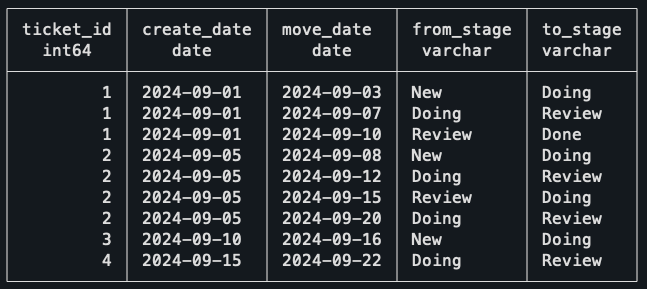
A summary of the data:

  • Ticket 1: Created in the New stage, moves normally to Doing, then Review, and then Done.
  • Ticket 2: Created in New, then moves: New → Doing → Review → Doing again → Review.
  • Ticket 3: Created in New, moves to Doing, but it is still stuck there.
  • Ticket 4: Created in the Doing stage, moves to Review afterward.

It might be a good idea to stop for a bit and think how you would deal with this. Can you find out how long a ticket stays on a single stage?

Honestly, this sounds intimidating at first, and it looks like it will be a nightmare to deal with all the edge cases. Let me show you the full solution to the problem, and then I will explain what is happening afterward.

```SQL

WITH stage_intervals AS (
    SELECT
        ticket_id,
        from_stage,
        move_date 
        - COALESCE(
            LAG(move_date) OVER (
                PARTITION BY ticket_id 
                ORDER BY move_date
            ), 
            create_date
        ) AS days_in_stage
    FROM
        ticket_moves
)
SELECT
    SUM(days_in_stage) / COUNT(DISTINCT ticket_id) as avg_days_in_doing
FROM
    stage_intervals
WHERE
    from_stage = 'Doing';
```
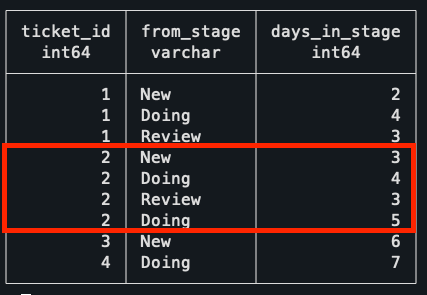
The first CTE uses the LAG function to find the previous move of the ticket, which will be the time the ticket entered that stage. Calculating the duration is as simple as subtracting the previous date from the move date.

What you should notice is the use of the COALESCE in the previous move date. What that does is that if a ticket doesn’t have a previous move, then it uses the date of creation of the ticket. This takes care of the cases of tickets being created directly into the Doing stage, as it still will properly calculate the time it took to leave the stage.

This is the result of the first CTE, showing the time spent in each stage. Notice how the Ticket 2 has two entries, as it visited the Doing stage in two separate occasions.
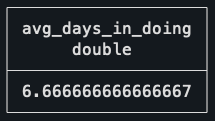
With this done, it’s just a matter of getting the average as the SUM of total days spent in doing, divided by the distinct number of tickets that ever left the stage. Doing it this way, instead of simply using the AVG, makes sure that the two rows for Ticket 2 get properly accounted for as a single ticket.

Not so bad, right?

The goal of this second challenge is to find the most recent contract sequence of every employee. A break of sequence happens when two contracts have a gap of more than one day between them. 

In this dataset, there are no contract overlaps, meaning that a contract for the same employee either has a gap or ends a day before the new one starts.

```SQL
CREATE TABLE contracts (
    contract_id integer PRIMARY KEY,
    employee_id integer NOT NULL,
    start_date date NOT NULL,
    end_date date NOT NULL
);

INSERT INTO contracts (contract_id, employee_id, start_date, end_date)
VALUES 
    -- Employee 1: Two continuous contracts
    (1, 1, '2024-01-01', '2024-03-31'),
    (2, 1, '2024-04-01', '2024-06-30'),
    -- Employee 2: One contract, then a gap of three days, then two contracts
    (3, 2, '2024-01-01', '2024-02-15'),
    (4, 2, '2024-02-19', '2024-04-30'),
    (5, 2, '2024-05-01', '2024-07-31'),
    -- Employee 3: One contract
    (6, 3, '2024-03-01', '2024-08-31');
```
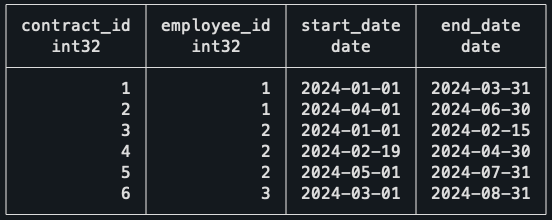
As a summary of the data:

  • Employee 1: Has two continuous contracts.
  • Employee 2: One contract, then a gap of three days, then two contracts.
  • Employee 3: One contract.

The expected result, given the dataset, is that all contracts should be included except for the first contract of Employee 2, which is the only one that has a gap.

Before explaining the logic behind the solution, I would like you to think about what operation can be used to join the contracts that belong to the same sequence. Focus only on the second row of data, what information do you need to know if this contract was a break or not?

I hope it’s clear that this is the perfect situation for window functions, again. They are incredibly useful for solving problems like this, and understanding when to use them helps a lot in finding clean solutions to problems.

First thing to do, then, is to get the end date of the previous contract for the same employee with the LAG function. Doing that, it’s simple to compare both dates and check if it was a break of sequence.

```SQL
WITH ordered_contracts AS (
    SELECT
        *,
        LAG(end_date) OVER (PARTITION BY employee_id ORDER BY start_date) AS previous_end_date
    FROM
        contracts
),
gapped_contracts AS (
    SELECT
        *,
        -- Deals with the case of the first contract, which won't have
        -- a previous end date. In this case, it's still the start of a new
        -- sequence.
        CASE WHEN previous_end_date IS NULL
            OR previous_end_date < start_date - INTERVAL '1 day' THEN
            1
        ELSE
            0
        END AS is_new_sequence
    FROM
        ordered_contracts
)
SELECT * FROM gapped_contracts ORDER BY employee_id ASC;
```
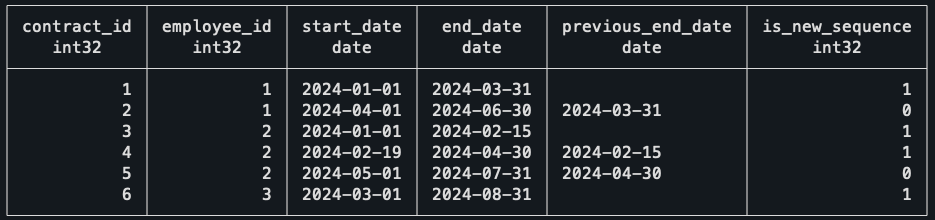
An intuitive way to continue the query is to number the sequences of each employee. For example, an employee who has no gap, will always be on his first sequence, but an employee who had 5 breaks in contracts will be on his 5th sequence. Funnily enough, this is done by another window function.

```SQL
--
-- Previous CTEs
--
sequences AS (
    SELECT
        *,
        SUM(is_new_sequence) OVER (PARTITION BY employee_id ORDER BY start_date) AS sequence_id
FROM
    gapped_contracts
)
SELECT * FROM sequences ORDER BY employee_id ASC;
```
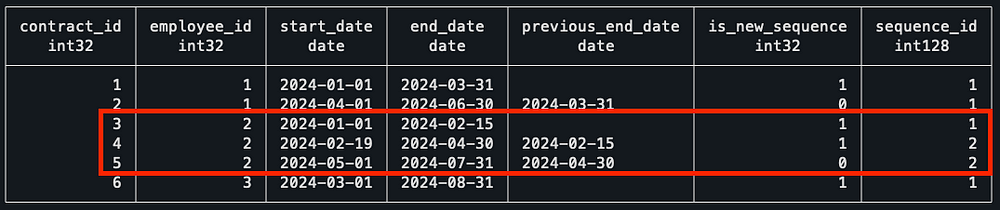
Notice how, for Employee 2, he starts his sequence #2 after the first gapped value. To finish this query, I grouped the data by employee, got the value of their most recent sequence, and then did an inner join with the sequences to keep only the most recent one.

```SQL
--
-- Previous CTEs
--
max_sequence AS (
    SELECT
        employee_id,
        MAX(sequence_id) AS max_sequence_id
FROM
    sequences
GROUP BY
    employee_id
),
latest_contract_sequence AS (
    SELECT
        c.contract_id,
        c.employee_id,
        c.start_date,
        c.end_date
    FROM
        sequences c
        JOIN max_sequence m ON c.sequence_id = m.max_sequence_id
            AND c.employee_id = m.employee_id
        ORDER BY
            c.employee_id,
            c.start_date
)
SELECT
    *
FROM
    latest_contract_sequence;
```

As expected, our final result is basically our starting query just with the first contract of Employee 2 missing! 

Finally, the last puzzle — I’m glad you made it this far. 

For me, this is the most mind-blowing one, as when I first encountered this problem I thought of a completely different solution that would be a mess to implement in SQL.

For this puzzle, I’ve changed the context from what I had to deal with for my job, as I think it will make it easier to explain. 

Imagine you’re a data analyst at an event venue, and you’re analyzing the talks scheduled for an upcoming event. You want to find the time of day where there will be the highest number of talks happening at the same time.

This is what you should know about the schedules:

  • Rooms are booked in increments of 30min, e.g. from 9h-10h30.
  • The data is clean, there are no overbookings of meeting rooms.
  • There can be back-to-back meetings in a single meeting room.

Meeting schedule visualized (this is the actual data). 

```SQL
CREATE TABLE meetings (
    room TEXT NOT NULL,
    start_time TIMESTAMP NOT NULL,
    end_time TIMESTAMP NOT NULL
);

INSERT INTO meetings (room, start_time, end_time) VALUES
    -- Room A meetings
    ('Room A', '2024-10-01 09:00', '2024-10-01 10:00'),
    ('Room A', '2024-10-01 10:00', '2024-10-01 11:00'),
    ('Room A', '2024-10-01 11:00', '2024-10-01 12:00'),
    -- Room B meetings
    ('Room B', '2024-10-01 09:30', '2024-10-01 11:30'),
    -- Room C meetings
    ('Room C', '2024-10-01 09:00', '2024-10-01 10:00'),
    ('Room C', '2024-10-01 11:30', '2024-10-01 12:00');
```
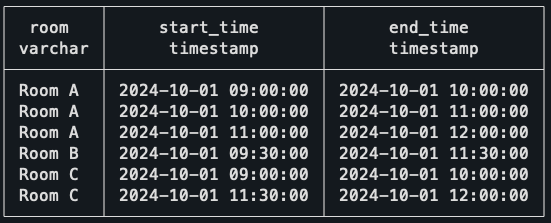
The way to solve this is using what is called a Sweep Line Algorithm, or also known as an event-based solution. This last name actually helps to understand what will be done, as the idea is that instead of dealing with intervals, which is what we have in the original data, we deal with events instead.

To do this, we need to transform every row into two separate events. The first event will be the Start of the meeting, and the second event will be the End of the meeting.

```SQL
WITH events AS (
  -- Create an event for the start of each meeting (+1)
  SELECT 
    start_time AS event_time, 
    1 AS delta
  FROM meetings
  UNION ALL
  -- Create an event for the end of each meeting (-1)
  SELECT 
   -- Small trick to work with the back-to-back meetings (explained later)
    end_time - interval '1 minute' as end_time,
    -1 AS delta
  FROM meetings
)
SELECT * FROM events;
```
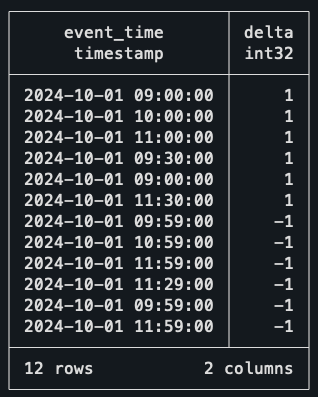
Take the time to understand what is happening here. To create two events from a single row of data, we’re simply unioning the dataset on itself; the first half uses the start time as the timestamp, and the second part uses the end time.

You might already notice the delta column created and see where this is going. When an event starts, we count it as +1, when it ends, we count it as -1. You might even be already thinking of another window function to solve this, and you’re actually right!

But before that, let me just explain the trick I used in the end dates. As I don’t want back-to-back meetings to count as two concurrent meetings, I’m subtracting a single minute of every end date. This way, if a meeting ends and another starts at 10h30, it won’t be assumed that two meetings are concurrently happening at 10h30.

Okay, back to the query and yet another window function. This time, though, the function of choice is a rolling SUM.

```SQL
--
-- Previous CTEs
--
ordered_events AS (
  SELECT
    event_time,
    delta,
    SUM(delta) OVER (ORDER BY event_time, delta DESC) AS concurrent_meetings
  FROM events
)
SELECT * FROM ordered_events ORDER BY event_time DESC;
```
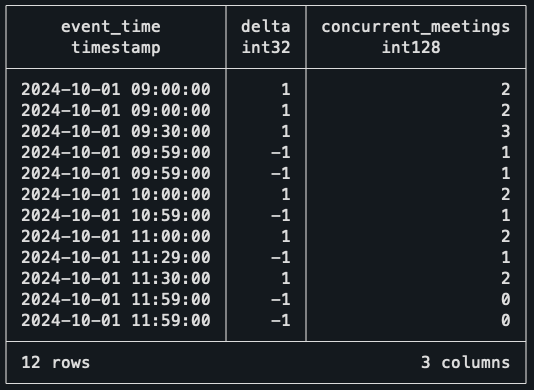
The rolling SUM at the Delta column is essentially walking down every record and finding how many events are active at that time. For example, at 9 am sharp, it sees two events starting, so it marks the number of concurrent meetings as two!

When the third meeting starts, the count goes up to three. But when it gets to 9h59 (10 am), then two meetings end, bringing the counter back to one. With this data, the only thing missing is to find when the highest value of concurrent meetings happens.

```SQL
--
-- Previous CTEs
--
max_events AS (
  -- Find the maximum concurrent meetings value
  SELECT 
    event_time, 
    concurrent_meetings,
    RANK() OVER (ORDER BY concurrent_meetings DESC) AS rnk
  FROM ordered_events
)
SELECT event_time, concurrent_meetings
FROM max_events
WHERE rnk = 1;
```
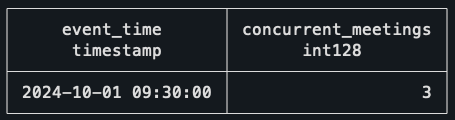
That’s it! The interval of 9h30–10h is the one with the largest number of concurrent meetings, which checks out with the schedule visualization above!

This solution looks incredibly simple in my opinion, and it works for so many situations. Every time you are dealing with intervals now, you should think if the query wouldn’t be easier if you thought about it in the perspective of events.

But before you move on, and to really nail down this concept, I want to leave you with a bonus challenge, which is also a common application of the Sweep Line Algorithm. I hope you give it a try!

Bonus challenge

The context for this one is still the same as the last puzzle, but now, instead of trying to find the period when there are most concurrent meetings, the objective is to find bad scheduling. It seems that there are overlaps in the meeting rooms, which need to be listed so it can be fixed ASAP.

How would you find out if the same meeting room has two or more meetings booked at the same time? Here are some tips on how to solve it:

  • It’s still the same algorithm.
  • This means you will still do the UNION, but it will look slightly different.
  • You should think in the perspective of each meeting room.

You can use this data for the challenge:

```SQL
CREATE TABLE meetings_overlap (
    room TEXT NOT NULL,
    start_time TIMESTAMP NOT NULL,
    end_time TIMESTAMP NOT NULL
);

INSERT INTO meetings_overlap (room, start_time, end_time) VALUES
    -- Room A meetings
    ('Room A', '2024-10-01 09:00', '2024-10-01 10:00'),
    ('Room A', '2024-10-01 10:00', '2024-10-01 11:00'),
    ('Room A', '2024-10-01 11:00', '2024-10-01 12:00'),
    -- Room B meetings
    ('Room B', '2024-10-01 09:30', '2024-10-01 11:30'),
    -- Room C meetings
    ('Room C', '2024-10-01 09:00', '2024-10-01 10:00'),
    -- Overlaps with previous meeting.
    ('Room C', '2024-10-01 09:30', '2024-10-01 12:00');
```

If you’re interested in the solution to this puzzle, as well as the rest of the queries, check this GitHub repo.

The first takeaway from this blog post is that window functions are overpowered. Ever since I got more comfortable with using them, I feel that my queries have gotten so much simpler and easier to read, and I hope the same happens to you.

If you’re interested in learning more about them, you would probably enjoy reading this other blog post I’ve written, where I go over how you can understand and use them effectively.

The second takeaway is that these patterns used in the challenges really do happen in many other places. You might need to find sequences of subscriptions, customer retention, or you might need to find overlap of tasks. There are many situations when you will need to use window functions in a very similar fashion to what was done in the puzzles.

The third thing I want you to remember is about this solution to using events besides dealing with intervals. I’ve looked at some problems I solved a long time ago that I could’ve used this pattern on to make my life easier, and unfortunately, I didn’t know about it at the time.


I really do hope you enjoyed this post and gave a shot to the puzzles yourself. And I’m sure that if you made it this far, you either learned something new about SQL or strengthened your knowledge of window functions! 

Thank you so much for reading. If you have questions or just want to get in touch with me, don’t hesitate to contact me at mtrentz.com.

All images by the author unless stated otherwise.

Shape
Shape
Stay Ahead

Explore More Insights

Stay ahead with more perspectives on cutting-edge power, infrastructure, energy,  bitcoin and AI solutions. Explore these articles to uncover strategies and insights shaping the future of industries.

Shape

Why 6 GHz Wi-Fi will make or break the modern enterprise

To date, 6 GHz Wi‑Fi deployments across enterprises remain in their early stages, with only a subset of organizations moving aggressively beyond Wi‑Fi 6 and legacy bands. Most corporate campuses, manufacturing plants, healthcare facilities, and retail environments continue to run primarily on 2.4 GHz and 5 GHz, even as their

Read More »

IBM partners with OpenAI to drive enterprise AI deployment

There will be three focus areas in the new partnership: helping organizations transform their businesses to integrate AI into their daily work, assisting clients in modernizing legacy applications through a combination of OpenAI products and IBM’s expertise, and an expansion of an existing cybersecurity collaboration combining OpenAI frontier AI capabilities

Read More »

Cisco rides ‘networking supercycle’ for strong Q4

Security revenue grew 14% year-over-year in Q4, with more than 1,500 customers adopting new products such as Secure Access, XDR, HyperShield, and AI Defense, bringing the total new customer count for these products to 6,400 since launch, Robbins noted. Firewall orders increased more than 30%, and AI security features like AI

Read More »

Equinor lets stimulation service contract for NCS assets

@import url(‘https://fonts.googleapis.com/css2?family=Inter:wght@100..900&display=swap’); .ebm-page__main h1, .ebm-page__main h2, .ebm-page__main h3, .ebm-page__main h4, .ebm-page__main h5, .ebm-page__main h6 { font-family: Inter; } body { line-height: 150%; letter-spacing: 0.025em; } button, .ebm-button-wrapper { font-family: Inter; } .label-style { text-transform: uppercase; color: var(–color-grey); font-weight: 600; font-size: 0.75rem; } .caption-style { font-size: 0.75rem; opacity: .6; } #onetrust-pc-sdk

Read More »

Energy Secretary Keeps Coal-Fired Generation Operational in the Midwest

WASHINGTON—U.S. Secretary of Energy Chris Wright issued an emergency order to address critical grid reliability issues in the Midwest. The emergency order directs the Midwest Independent System Operator (MISO), in coordination with Consumers Energy, to ensure that the 1,420-megawatt (MW) J.H. Campbell coal-fired power plant (Campbell Plant) in West Olive, Michigan is available to operate and to employ economic dispatch to minimize costs for American families and businesses. The Campbell Plant was originally scheduled to shut down on May 31, 2025, 15 years before the end of its scheduled design life. Since the U.S. Department of Energy’s (DOE) original order issued on May 23, 2205, the Campbell Plant has proven critical to MISO’s operations, operating regularly during periods of high energy demand and low levels of intermittent energy production. Subsequent orders were issued throughout 2025 and 2026. This order is in effect beginning on August 17, 2026, through November 14, 2026. “President Trump and the Energy Department remain committed to doing everything in our power to mitigate the possibility of power outages for American families and businesses,” Secretary Wright said. “Ensuring coal plants such as the Campbell Plant are available to operate during periods of high electricity demand saves lives. Americans deserve access to affordable, reliable, and secure electricity regardless of whether the wind is blowing or the sun is shining.” In January 2026, North American Electric Reliability Corporation (NERC) released its 2025 Long-Term Reliability Assessment. NERC assessed that the MISO region is at high risk of energy shortfalls over the next five years, stating that it faces significant reliability challenges as “projected resource additions do not keep pace with escalating demand forecasts and announced generator retirements.” NERC released its 2026 State of Reliability (SOR) on June 4, 2026. In its technical discussion of major system events, NERC states “shoulder reasons

Read More »

Hydrocarbons and Geothermal Energy Office Announces Up to $10.75 Million to Support University Training and Research for Subsurface Energy Development

WASHINGTON—The U.S. Department of Energy’s (DOE) Hydrocarbons and Geothermal Energy Office (HGEO) today announced up to $10.75 million in federal funding to support novel, early-stage research and development (R&D) projects at eligible U.S. colleges and universities. The funding opportunity is offered through HGEO’s University Training and Research (UTR) Program, which aims to train the next generation of engineers and scientists for careers in energy-related research to help ensure affordable, reliable, and secure energy for all Americans. “Continuing to increase domestic energy production from our vast coal, oil, gas, and geothermal resources requires a workforce of trained, qualified professionals to advance innovative subsurface energy technologies,” said DOE Acting Assistant Secretary of the Hydrocarbons and Geothermal Energy Office Curt Coccodrilli. “By investing in skills-based training that emphasizes industry-driven strategies, we will help meet the needs of our evolving energy economy while strengthening America’s energy leadership and independence.”  Funding awarded under this notice of funding opportunity (NOFO) is intended to increase R&D opportunities for students in science, technology, engineering and mathematics. Relevant academic disciplines include, but are not limited to engineering, chemistry, physics, mining, geosciences, computer science and education.  Selected projects will support one topic area—Innovative Research and Training for Subsurface Energy Production. This topic area seeks university-led R&D proposals focused on accelerating innovative energy technologies toward commercial viability while simultaneously developing a skilled workforce for the evolving energy sector. The topic area is split into three subtopics  focused on coal, oil and gas, and geothermal energy, respectively, ensuring that projects awarded through the UTR Program complement the R&D investments from HGEO’s Office of Subsurface Energy. Projects will address critical workforce skill gaps by integrating student participation directly into the R&D process and developing training modules that will have a lasting impact on student training beyond the awarded project. In addition, projects must include a non-academic partner to ensure research relevance

Read More »

Energy Department Modernizes National Laboratory Operations to Strengthen America’s Scientific, Energy, and National Security Missions

WASHINGTON—The U.S. Department of Energy (DOE) today announced updated operating directives for its National Laboratories, plants, and sites as part of a broader effort to modernize operations across DOE’s laboratory complex.  To advance President Trump’s commitment to Restoring Gold Standard Science, DOE is updating outdated and duplicative operating requirements to give its world-class scientific workforce more time to focus on critical science, energy, and national security missions. These reforms will improve efficiency, strengthen stewardship of taxpayer resources, and help DOE’s National Laboratories, plants, and sites operate with the speed, discipline, and agility their missions demand, while maintaining rigorous safety and security standards.  “America’s National Laboratories are among our nation’s greatest scientific assets and have powered generations of American discovery and innovation,” said U.S. Secretary of Energy Chris Wright. “President Trump has called on DOE to build on that legacy by restoring Gold Standard Science and unleashing the full potential of American ingenuity. By removing unnecessary barriers, we are giving our scientists, engineers, and technicians, more freedom to focus on the critical missions that matter most.” Working with laboratory leaders and subject matter experts, DOE reviewed a targeted set of directives governing day-to-day field operations. Its reforms build on more than three decades of recommendations from Congress, the Government Accountability Office, the National Academies, and other independent reviews that have identified unnecessary complexity in DOE’s directives framework.  DOE is acting on these longstanding recommendations while preserving strong oversight, accountability, and operational excellence—including strong protections for DOE workers, the public, the environment, and the Nation’s nuclear security enterprise.   DOE’s National Laboratories, plants, and sites carry out some of the nation’s most consequential scientific, engineering, and national security missions. Today’s action better aligns their operations with the pace and complexity of today’s missions, giving its scientific workforce more time to develop technologies, strengthen American

Read More »

Energy Secretary Announces Cancellation of Three Proposed National Interest Electric Transmission Corridors

WASHINGTON—U.S. Secretary of Energy Chris Wright today announced that the U.S. Department of Energy (DOE) will not move forward with designating the three proposed National Interest Electric Transmission Corridors (NIETCs) previously selected in December 2024 to advance in the review process. “Extensive review, including public feedback and stakeholder input, made clear that the current designation process for these three proposed transmission corridors should not continue,” said Secretary Wright. “Transmission policy must serve the American people—not special interests or a climate-alarmist agenda that drives up costs, worsens reliability, and disregards the concerns of local communities. The Trump Administration is committed to strengthening America’s electric grid with common-sense policies that prioritize delivering affordable, reliable, and secure electricity to American families and businesses.” The previous administration touted the Lake Erie–Canada Corridor, the Southwestern Grid Connector Corridor, and the Tribal Energy Access Corridor, as a means to advance their Green New Scam agenda and “accelerate decarbonization.” As the process unfolded, the current designation framework proved ineffective in strengthening grid reliability and reducing electricity costs. In some communities, it also contributed to confusion and concern about the scope and intent of NIETC authority. Thanks to President Trump and Secretary Wright, DOE has already taken numerous steps to build new transmission infrastructure and modernize existing infrastructure, including: In October 2025, DOE’s Office of Energy Dominance Financing (EDF) closed a $1.6 billion loan guarantee to AEP Transmission to reconductor and rebuild nearly 5,000 miles of transmission lines across five states.  In February 2026, DOE’s Office of Energy Dominance Financing (EDF) closed $26.5 billion in loans to Southern Company subsidiaries Georgia power and Alabama Power to support generation and grid investments, including more than 1,300 miles of transmission and grid enhancement projects.  In March 2026, DOE’s Office of Electricity (OE) announced the $1.9 billion SPARK funding opportunity to

Read More »

Permian Resources lifts forecast on working interest gains, acquisitions

@import url(‘https://fonts.googleapis.com/css2?family=Inter:wght@100..900&display=swap’); .ebm-page__main h1, .ebm-page__main h2, .ebm-page__main h3, .ebm-page__main h4, .ebm-page__main h5, .ebm-page__main h6 { font-family: Inter; } body { line-height: 150%; letter-spacing: 0.025em; } button, .ebm-button-wrapper { font-family: Inter; } .label-style { text-transform: uppercase; color: var(–color-grey); font-weight: 600; font-size: 0.75rem; } .caption-style { font-size: 0.75rem; opacity: .6; } #onetrust-pc-sdk [id*=btn-handler], #onetrust-pc-sdk [class*=btn-handler] { background-color: #c19a06 !important; border-color: #c19a06 !important; } #onetrust-policy a, #onetrust-pc-sdk a, #ot-pc-content a { color: #c19a06 !important; } #onetrust-consent-sdk #onetrust-pc-sdk .ot-active-menu { border-color: #c19a06 !important; } #onetrust-consent-sdk #onetrust-accept-btn-handler, #onetrust-banner-sdk #onetrust-reject-all-handler, #onetrust-consent-sdk #onetrust-pc-btn-handler.cookie-setting-link { background-color: #c19a06 !important; border-color: #c19a06 !important; } #onetrust-consent-sdk .onetrust-pc-btn-handler { color: #c19a06 !important; border-color: #c19a06 !important; } The leaders of Permian Resources Corp., Midland, have lifted their production and capital spending forecasts for 2026 after recently closing on a $520 million acquisition, exercising an option for a 5,600-acre bolt-on buy and growing its working interest in completed wells more than expected. Permian Resources on July 31 closed on the purchase of about 20,500 acres in the Delaware basin’s Ward County that are largely non-operated and produce about 5,000 boe/d. The land sits adjacent to Permian property but James Walter, co-chief executive officer, told analysts on Aug. 6 that his team have since struck a deal with another operator that will trade some of the acquired bolt-on parcels as well as other acreage with goals of densifying Permian Resources’ holdings and lowering the share of acres that are non-operated or have low working interest. Permian Resources Corp. Permian Resources’ trade in Ward County with another operator is expected to close later this quarter. <!–> ]–> “The trade also increases the number of operating net locations from 50 to 120 while increasing the average lateral length by 20%,” Hickey said. “We view this trade as a true win-win for [Permian Resources] and our counterparty, who

Read More »

Canada rig count down 3 units

The rig count in Canada fell by 3 units to 216 rigs working for the week ended Aug. 7, according to data from Baker Hughes. A 4-rig drop in oil-directed rigs in Canada was partially offset by a 2-unit gain in gas-directed rigs. There were 146 oil-directed rigs working in Canada this week, while those drilling for gas ended the week at 65 units working. The overall US drilling rig count was unchanged this week at 588 rigs working. That number is up 49 units from this time last year. In the US, 3 additional rigs were drilling for oil, bringing the total count to 454. That number is up 43 units from this time last year. The number of gas-directed rigs fell by 3 to 124 working for the week. This time last year, 123 rigs were drilling for gas in the US. There were 572 rigs drilling on US land this week, unchanged from last week and up 48 from the year-ago period. A 1-rig increase in offshore rigs offset a 1-unit decrease in rigs drilling in inland waters. There were 14 rigs drilling offshore and 2 in inland waters this week. Leading the major oil-and gas-producing states was Texas with a 2-unit gain to end the week with 275 rigs working. The count is up 32 units from this time in 2025. Pennsylvania and Wyoming each dropped a rig to bring the respective rig counts to 16 and 15 for the week.

Read More »

Texas Tightens Oversight of Data Center Development

Texas has spent the past decade building one of the most data center-friendly policy environments in the United States. But the state’s political posture is tightening. The emerging message from Austin is that continued data center growth will face greater scrutiny over grid costs, water use, tax incentives and community impacts. What is interesting about this policy conversation is that the Texas Legislature is not in regular session. The 89th regular session ended June 2, 2025, and the 90th Legislature does not convene until January 12, 2027. What has occurred instead is a concentrated period of interim committee work, gubernatorial recommendations, implementation of Senate Bill 6, calls for a special session, and regulatory action by the Public Utility Commission of Texas and the Electric Reliability Council of Texas. Together, those efforts are creating the framework for a broader legislative debate in 2027 while already affecting projects seeking ERCOT interconnection, infrastructure costs and site-selection decisions. Abbott Sets Out a New Policy Framework The policy shift accelerated June 10, when Gov. Greg Abbott directed the PUCT to require data centers to fully fund the electric infrastructure needed to serve their operations and directed PUCT and ERCOT to identify additional actions available under existing authority. Separately, Abbott pledged to work with lawmakers in 2027 on legislation requiring data centers to add electric capacity, use water-efficient cooling systems, report electricity and water use, phase out outdated tax incentives and adopt additional protections for neighboring communities. The most consequential shift began June 10, when Gov. Greg Abbott sent state electricity regulators a sweeping list of data center policy priorities. Abbott called for future legislation requiring new facilities to add generation to the Texas grid, pay the full cost of their interconnection and related infrastructure, use closed-loop or similarly water-efficient cooling systems, and file annual reports

Read More »

NVIDIA Pushes the AI Factory From Rack to Asset Class

Making Compute Underwritable Huang expanded the argument a day later in an NVIDIA blog describing AI factory compute as an emerging investable asset class. NVIDIA’s case begins with a definition. The company does not describe its compute platform simply as a GPU. It includes accelerated computing, networking, systems software, AI frameworks and the CUDA software ecosystem surrounding the hardware. That wider platform matters to the financing thesis because NVIDIA argues it increases the number of potential users for an installed AI system. An NVIDIA DSX AI factory could support language models, vision, speech, biological computing, robotics, physical AI and other workloads. The same infrastructure could potentially move among customers, clouds or operators as demand changes. In financial terms, NVIDIA is arguing for fungibility. That could become particularly important to lenders and infrastructure investors trying to determine what happens if an original customer disappears, a contract expires or the economics of a particular workload change. A GPU cluster tied economically to one speculative tenant is one thing. Compute that can be redeployed across a large global market of clouds, enterprises, AI developers and model providers is a different risk proposition. NVIDIA contends that this breadth of potential offtakers helps protect residual value. Whether institutional markets ultimately price that risk the way NVIDIA hopes remains to be seen. But the company is now explicitly trying to establish a financial framework around that premise. Challenging the Traditional Depreciation Curve NVIDIA’s second argument is that software can extend the economic life of installed hardware. CUDA is central to that case. The company maintains that successive software improvements can increase the performance and efficiency of systems that have already been deployed, allowing the same hardware to produce more useful work at lower cost over time. That does not eliminate hardware obsolescence. New GPU generations continue

Read More »

The Next Data Center Constraint: Trust

When Facts Aren’t Enough Few places offer a more revealing test case than Loudoun County, Virginia. Data Center Alley has spent decades living with data center development at a scale most emerging markets will never approach. Rizer said Loudoun’s experience gives the county an unusually deep record with which to answer questions about environmental impacts, infrastructure and economic benefits. But those facts increasingly struggle to penetrate the broader public debate. Rizer said Loudoun today has more than 250 data centers, while the entire sector uses less than 10% of the county water system. He also pointed to improved air quality over the past decade and approximately $1.2 billion in tax revenue from the industry. Yet he acknowledged that simply producing another data point does little good when residents no longer trust the people presenting it. “I call it community concern whack-a-mole, because every time you address one thing, there are three others that pop up,” Rizer said. The problem, in his view, has become partly emotional rather than informational. “You can’t change how people think until you change how they feel,” he said. “And right now they feel angry, they feel confused, they are fearful, they are mistrustful, both of government and the big tech industry.” That distinction matters. The industry’s instinct has often been to counter criticism with facts: tax receipts, job numbers, water-use calculations, emissions data or explanations of how a particular cooling system works. Those facts remain important. But Rizer’s argument is that the industry must first rebuild enough credibility for communities to hear them. The Industry’s Unforced Errors Not all of the distrust has arrived from outside the industry. Rizer and Waitkunas were equally pointed about mistakes by developers and operators that have given opponents powerful examples to use against data center projects elsewhere. “The industry

Read More »

Reports: Data Center Expansion Finds Its Contours

AI Density Is Arriving Unevenly Inside the data center, the AI transition remains equally uneven. Uptime’s 2026 survey found the average modal, or most common, rack density across respondents exceeding 11 kW for the first time, up from 9 kW in 2025. But that number requires context. A relatively small group of very high-density facilities pulls the average upward. Without those facilities, Uptime puts average modal rack density at 7.8 kW, only modestly higher than 7.5 kW in 2025. The industry therefore continues to operate two realities at once: a vast installed base running conventional rack densities and a rapidly emerging class of AI facilities pushing far beyond them. The latter is becoming more visible. Some 24% of Uptime respondents now report racks at 30 kW or higher, up from 19% last year. Much of the increase occurred above 50 kW, and some operators reported deployments exceeding 100 kW. Still, most surveyed facilities have no racks at 30 kW or above. AI inference is also moving up the density curve. For the first time in Uptime’s survey, generative AI inference matched AI training as a driver of respondents’ highest-density deployments, with 21% citing each workload. That matters because inference potentially pushes AI infrastructure requirements beyond a relatively concentrated population of model-training campuses and into a broader set of facilities and markets. Power Is Both Constraint and Risk No issue connects the three reports more consistently than power. It limits new site availability. It redirects development toward emerging markets. It shapes community debates. It affects density and cooling architecture. And once a facility is operating, it remains the largest source of outage risk. Uptime says 56% of operators who experienced an impactful outage identified power as the primary cause of their most recent incident. The institute cautions against treating the increase

Read More »

DCF Poll: What Will Constrain Data Center Growth Next?

Matt Vincent is Editor in Chief of Data Center Frontier, where he leads editorial strategy and coverage focused on the infrastructure powering cloud computing, artificial intelligence, and the digital economy. A veteran B2B technology journalist with more than two decades of experience, Vincent specializes in the intersection of data centers, power, cooling, and emerging AI-era infrastructure. Since assuming the EIC role in 2023, he has helped guide Data Center Frontier’s coverage of the industry’s transition into the gigawatt-scale AI era, with a focus on hyperscale development, behind-the-meter power strategies, liquid cooling architectures, and the evolving energy demands of high-density compute, while working closely with the Digital Infrastructure Group at Endeavor Business Media to expand the brand’s analytical and multimedia footprint. Vincent also hosts The Data Center Frontier Show podcast, where he interviews industry leaders across hyperscale, colocation, utilities, and the data center supply chain to examine the technologies and business models reshaping digital infrastructure. Since its inception he serves as Head of Content for the Data Center Frontier Trends Summit. Before becoming Editor in Chief, he served in multiple senior editorial roles across Endeavor Business Media’s digital infrastructure portfolio, with coverage spanning data centers and hyperscale infrastructure, structured cabling and networking, telecom and datacom, IP physical security, and wireless and Pro AV markets. He began his career in 2005 within PennWell’s Advanced Technology Division and later held senior editorial positions supporting brands such as Cabling Installation & Maintenance, Lightwave Online, Broadband Technology Report, and Smart Buildings Technology. Vincent is a frequent moderator, interviewer, and keynote speaker at industry events including the HPC Forum, where he delivers forward-looking analysis on how AI and high-performance computing are reshaping digital infrastructure. He graduated with honors from Indiana University Bloomington with a B.A. in English Literature and Creative Writing and lives in southern New Hampshire with

Read More »

Is your networking built for AI’s traffic patterns and data volumes?

As data centers evolve into AI factories, compute has shifted from a cost center to a revenue driver. “Compute is revenue,” said Jensen Huang, co-founder and CEO of NVIDIA. “Without compute, there is no way to generate tokens. Without tokens, there’s no way to generate revenue. So, in this new world of AI, compute equals revenue.” This reframe changes an organizations’ calculus. If compute is revenue, what do you optimize for? Here are 5 questions to consider: Are you measuring what actually drives AI factory revenue? Most AI factories are power-constrained, so tokens per watt dictate how much revenue you can generate and the cost per token impacts the AI factory profit margin. But neither of these metrics should be evaluated at a single operating point. Batch jobs, real-time chat, and agentic workloads demand different points on the throughput-latency curve. AI chips that perform well at only a few points will underserve the full range of workloads. Additional key operational metrics like time to first token (TTFT), mean time between interruptions (MTBI), and platform useful life are the bedrock of AI factory efficiency. They dictate how quickly an AI factory comes online to generate tokens, the reliability of its revenue streams, and its long-term ability to remain productive as AI workloads evolve. How does agentic AI change what your CPU needs to deliver? Data center CPUs have historically been optimized for parallel throughput, where more cores improve aggregate capacity.  Agentic workloads run in loops and make different demands. The model reasons on the GPU, the CPU executes tool calls such as code compilation and data retrieval, and the result returns to the GPU so the model can reason again. Every step runs in sequence, gated by the one before it. Per-core performance and memory latency determine how fast each step

Read More »

Microsoft will invest $80B in AI data centers in fiscal 2025

And Microsoft isn’t the only one that is ramping up its investments into AI-enabled data centers. Rival cloud service providers are all investing in either upgrading or opening new data centers to capture a larger chunk of business from developers and users of large language models (LLMs).  In a report published in October 2024, Bloomberg Intelligence estimated that demand for generative AI would push Microsoft, AWS, Google, Oracle, Meta, and Apple would between them devote $200 billion to capex in 2025, up from $110 billion in 2023. Microsoft is one of the biggest spenders, followed closely by Google and AWS, Bloomberg Intelligence said. Its estimate of Microsoft’s capital spending on AI, at $62.4 billion for calendar 2025, is lower than Smith’s claim that the company will invest $80 billion in the fiscal year to June 30, 2025. Both figures, though, are way higher than Microsoft’s 2020 capital expenditure of “just” $17.6 billion. The majority of the increased spending is tied to cloud services and the expansion of AI infrastructure needed to provide compute capacity for OpenAI workloads. Separately, last October Amazon CEO Andy Jassy said his company planned total capex spend of $75 billion in 2024 and even more in 2025, with much of it going to AWS, its cloud computing division.

Read More »

John Deere unveils more autonomous farm machines to address skill labor shortage

Join our daily and weekly newsletters for the latest updates and exclusive content on industry-leading AI coverage. Learn More Self-driving tractors might be the path to self-driving cars. John Deere has revealed a new line of autonomous machines and tech across agriculture, construction and commercial landscaping. The Moline, Illinois-based John Deere has been in business for 187 years, yet it’s been a regular as a non-tech company showing off technology at the big tech trade show in Las Vegas and is back at CES 2025 with more autonomous tractors and other vehicles. This is not something we usually cover, but John Deere has a lot of data that is interesting in the big picture of tech. The message from the company is that there aren’t enough skilled farm laborers to do the work that its customers need. It’s been a challenge for most of the last two decades, said Jahmy Hindman, CTO at John Deere, in a briefing. Much of the tech will come this fall and after that. He noted that the average farmer in the U.S. is over 58 and works 12 to 18 hours a day to grow food for us. And he said the American Farm Bureau Federation estimates there are roughly 2.4 million farm jobs that need to be filled annually; and the agricultural work force continues to shrink. (This is my hint to the anti-immigration crowd). John Deere’s autonomous 9RX Tractor. Farmers can oversee it using an app. While each of these industries experiences their own set of challenges, a commonality across all is skilled labor availability. In construction, about 80% percent of contractors struggle to find skilled labor. And in commercial landscaping, 86% of landscaping business owners can’t find labor to fill open positions, he said. “They have to figure out how to do

Read More »

2025 playbook for enterprise AI success, from agents to evals

Join our daily and weekly newsletters for the latest updates and exclusive content on industry-leading AI coverage. Learn More 2025 is poised to be a pivotal year for enterprise AI. The past year has seen rapid innovation, and this year will see the same. This has made it more critical than ever to revisit your AI strategy to stay competitive and create value for your customers. From scaling AI agents to optimizing costs, here are the five critical areas enterprises should prioritize for their AI strategy this year. 1. Agents: the next generation of automation AI agents are no longer theoretical. In 2025, they’re indispensable tools for enterprises looking to streamline operations and enhance customer interactions. Unlike traditional software, agents powered by large language models (LLMs) can make nuanced decisions, navigate complex multi-step tasks, and integrate seamlessly with tools and APIs. At the start of 2024, agents were not ready for prime time, making frustrating mistakes like hallucinating URLs. They started getting better as frontier large language models themselves improved. “Let me put it this way,” said Sam Witteveen, cofounder of Red Dragon, a company that develops agents for companies, and that recently reviewed the 48 agents it built last year. “Interestingly, the ones that we built at the start of the year, a lot of those worked way better at the end of the year just because the models got better.” Witteveen shared this in the video podcast we filmed to discuss these five big trends in detail. Models are getting better and hallucinating less, and they’re also being trained to do agentic tasks. Another feature that the model providers are researching is a way to use the LLM as a judge, and as models get cheaper (something we’ll cover below), companies can use three or more models to

Read More »

OpenAI’s red teaming innovations define new essentials for security leaders in the AI era

Join our daily and weekly newsletters for the latest updates and exclusive content on industry-leading AI coverage. Learn More OpenAI has taken a more aggressive approach to red teaming than its AI competitors, demonstrating its security teams’ advanced capabilities in two areas: multi-step reinforcement and external red teaming. OpenAI recently released two papers that set a new competitive standard for improving the quality, reliability and safety of AI models in these two techniques and more. The first paper, “OpenAI’s Approach to External Red Teaming for AI Models and Systems,” reports that specialized teams outside the company have proven effective in uncovering vulnerabilities that might otherwise have made it into a released model because in-house testing techniques may have missed them. In the second paper, “Diverse and Effective Red Teaming with Auto-Generated Rewards and Multi-Step Reinforcement Learning,” OpenAI introduces an automated framework that relies on iterative reinforcement learning to generate a broad spectrum of novel, wide-ranging attacks. Going all-in on red teaming pays practical, competitive dividends It’s encouraging to see competitive intensity in red teaming growing among AI companies. When Anthropic released its AI red team guidelines in June of last year, it joined AI providers including Google, Microsoft, Nvidia, OpenAI, and even the U.S.’s National Institute of Standards and Technology (NIST), which all had released red teaming frameworks. Investing heavily in red teaming yields tangible benefits for security leaders in any organization. OpenAI’s paper on external red teaming provides a detailed analysis of how the company strives to create specialized external teams that include cybersecurity and subject matter experts. The goal is to see if knowledgeable external teams can defeat models’ security perimeters and find gaps in their security, biases and controls that prompt-based testing couldn’t find. What makes OpenAI’s recent papers noteworthy is how well they define using human-in-the-middle

Read More »