Stay Ahead, Stay ONMINE

I Deployed My Data Pipeline to AWS. Then Everything That Was “Local” Broke.

For the past few months, I’ve been building a small data pipeline entirely on my Windows machine. RSS ingestion running in WSL2, Postgres in Docker, Kestra orchestrating the whole thing, dbt transforming the data on top. Every piece worked. I had a working lineage graph, passing tests, a scheduled flow that fetched articles and saved them to a database.It all worked because it was all sitting in one place. My laptop.This article is about what happened when I tried to move it off my laptop and onto a real server, using nothing but the CLI. I expected the hard part to be AWS itself: accounts, instances, networking. It wasn’t. The hard part was everything I didn’t know I’d built on top of “it’s all running on the same machine.” That assumption was doing more work than I realized, and taking it away broke things one at a time, in ways that taught me more than the original build did.Setting up the boxGetting a server running was, honestly, the easy part.I created an AWS account on the newer $100-credit free tier, set up an IAM user for CLI work instead of using root (a small good habit that saved me from myself more than once), and launched a t3.small EC2 instance running Ubuntu 22.04.A few small surprises came up along the way. Nothing major, but enough to remind me that a cloud server isn’t just my computer in a different location.The default 8GB disk was too small before I’d even started. Resizing it meant running growpart and resize2fs, and the instructions I found online kept referencing a device called xvda. My instance didn’t have one. Newer instance types use the Nitro system, which names drives things like `nvme0n1` instead. Small naming difference, but it’s the kind of thing that makes you doubt everything else you’re about to type, since if the first command doesn’t even find its target, what else is going to quietly not apply.I also saw the instance go “impaired” at one point while Kestra was pulling its Docker image for the first time. My best guess was that it had run out of memory. I added a 1GB swap file as a bit of extra breathing room, and it hasn’t happened since. Basically, it gives the system somewhere to offload memory when the RAM gets full, using disk space as a slower backup. It was a simple fix, but it was also my first reminder that a rented server doesn’t have quite the same headroom I’d gotten used to on my laptop.I attached an Elastic IP so the server’s address wouldn’t change every time I stopped and started it, and locked down the security group so only my own IP could reach ports 22 (SSH), 8080 (Kestra’s UI), and 5432 (Postgres). That last part turned into its own minor recurring chore: my home internet doesn’t give me a fixed IP address, so most sessions started with me re-authorizing whatever address I currently had before anything else would even load.None of this was hard. It was just a lot of small, specific facts about this particular kind of computer that nothing in my local setup had ever forced me to learn.Getting the pipeline overI installed Docker, brought over my project with rsync instead of git, since my repo is public and my .env file has real secrets in it, and ran docker compose up -d. Postgres came up healthy. Kestra came up too.One thing caught me off guard here: Kestra’s flows don’t live in files that sync automatically when you copy a project over. They live inside Kestra’s own internal database. My one flow, fetch_rss, simply didn’t exist on the server until I pasted its YAML into the UI myself. It’s a small thing, but it’s the first hint of a pattern that showed up again and again during this whole process: things that felt like “my project” were actually split across two different kinds of state, files I own and copy around, and internal state that lives only inside the running system.I clicked Execute. It failed immediately.The toolbox that wasn’t thereMy flow used a Process task runner for the actual work. It built the Python virtual environment, installed the dependencies, and ran my ETL script. That was exactly how I had it set up locally, and it had never caused me any problems.The error was about a missing package: python3.12-venv. Digging in, I learned something I genuinely hadn’t considered. The Process task runner doesn’t run on the EC2 host. It runs inside Kestra’s own container. Kestra’s container had Python, but not the piece needed to build a virtual environment.I fixed it temporarily by running apt-get install -y python3.12-venv directly inside the container. It worked, but I knew it wouldn’t survive a restart because the change wasn’t part of the image itself. I’d fixed the immediate problem, but not the underlying setup.This is where I had to make a real decision, and it’s the first genuinely useful lesson from this whole project: the manager and the worker shouldn’t be the same thing. Kestra’s job is to decide when things run and keep track of them. It is not supposed to also be the thing building Python environments and installing packages by hand. Every time a task needed something new, I’d be rebuilding Kestra’s own image to fit, which is a strange amount of responsibility to hand to your orchestrator.Instead of trying to keep patching Kestra itself, I moved the actual work out of it and switched the task to Kestra’s Docker task runner. The idea was pretty simple: Kestra would spin up a separate container just for the Python job, run the ETL script there, and get rid of the container when the job was done. It was closer to how I wanted the setup to work, although I was about to run into a few more complications.Giving the manager a key it didn’t know it neededFor Kestra to launch a separate worker container, it needs to be able to talk to Docker itself, the actual daemon managing containers on the host. The way you grant that is by mounting the Docker socket into Kestra’s own container:kestra:  volumes:    – /var/run/docker.sock:/var/run/docker.sockThis is worth sitting with for a second, because it’s not a neutral decision. Anything with access to that socket can effectively ask Docker to do anything on the host, including spinning up containers with far more access than they should have. Locally, on my own laptop, this never registered as a real tradeoff. On a machine sitting on the open internet, it’s a genuine one. I decided it was acceptable for a learning project running a single low-stakes flow, but it’s exactly the kind of decision that deserves to be made on purpose, not discovered by accident three steps into a debugging session.With the socket mounted, I updated the flow to use the Docker task runner and pointed it at a python:3.12-slim image. First real test: Permission denied.Turned out the socket being mounted wasn’t enough. Kestra’s own process inside the container wasn’t running as root, and that particular door only opens for root. Having the key isn’t the same as being allowed to use it. Adding user: “0:0” to Kestra’s service definition fixed it, though not before I spent a confusing round-trip discovering that Docker Compose doesn’t always rebuild a container just because you changed a line in the file. docker compose up -d –force-recreate kestra was the command that actually made the change take effect. up -d alone quietly decided nothing important had changed.The volume that wasn’t really thereWith permissions sorted, the flow ran further, and hit a new wall: Could not open requirements file: No such file or directory.I’d mounted my project folder into the worker container so it could see the script and its dependencies. I could prove the mount worked by running the exact same docker run command by hand, outside of Kestra, and it worked perfectly. Whatever Kestra was doing, it wasn’t the same thing.This ended up being the longest detour in the whole project, and honestly, probably the one that annoyed me the most in hindsight. The worst part was how quietly it failed. I first tried a setting called volume-enabled, but I had it in the wrong part of the config. Then I tried again with the correct property name, volumeEnabled—no dash—and put it in the right place, under plugins.configurations, targeting the Docker task runner plugin by its full class name. Still nothing.No error. No warning. Nothing. It just kept silently ignoring the setting.Eventually, I found the real explanation: host-folder mounting for the Docker task runner appears to require Kestra’s Enterprise edition. I’d been chasing a setting that simply doesn’t work on the free tier I’m using. It wasn’t a typo or a misconfiguration. I was basically trying to open a door that I didn’t even know was locked. The frustrating part was that Kestra never made that clear—it just quietly ignored the setting and left me wondering what I was doing wrong.I want to flag this specifically for anyone following a similar path: when a setting appears to do nothing no matter how correctly you write it, stop assuming you have the syntax wrong. Check whether the feature exists in the edition you’re actually running.The way that’s actually meant to workThe fix wasn’t to force the mount to work. It was to stop trying to mount anything at all.Kestra has a feature called Namespace Files, essentially a small file store that lives inside Kestra itself. You upload your project’s files into it once, and Kestra hands them to worker containers automatically at runtime, no host folder access required. It’s the fully-supported version of what I was trying to hack together with volumes.Uploading them from the server turned into its own small chain of mistakes, which by this point in the day felt almost expected. I tried a PUT request first; Kestra wanted a POST with the file wrapped as multipart form data. I got that right and got back silence, no confirmation, no error, which I initially read as success. It wasn’t. A curl -i flag to actually show me the response headers revealed the real problem: 401 Unauthorized. Basic auth had been on the whole time, my browser just never told me because it was already logged in. curl has no memory like that. Adding -u username:password to every request fixed it.Once the files were uploading, I made a habit of checking each one immediately after, since one early batch attempt had somehow paired the wrong file sizes with the wrong filenames. Slower, but it meant every mismatch got caught the moment it happened instead of surfacing three steps later as a mysterious script error.With all six files confirmed correct, I rewrote the flow to use `namespaceFiles: enabled: true` instead of a volume mount, and switched the file paths from absolute (`/workspace/python/…`) to relative (`python/…`), since Namespace Files land directly in the container’s working directory rather than wherever I’d been mounting things.This time, it actually ran the script. Fetched 25 articles. Parsed them. And then:psycopg.OperationalError: connection failed: connection to server at “127.0.0.1”, port 5432 failed: Connection refusedThe last assumption: localhost isn’t a placeThis was the smallest fix of the whole day, and also the most honest one, in the sense that it exposed an assumption I’d never had reason to question before.My database config had DB_HOST=localhost by default. And locally, that was perfectly fine. Everything was running on the same machine, so saying “the database is right here” was actually true.But on AWS, Kestra’s worker was running in its own separate container. So when it tried to connect to localhost, it was basically looking inside its own little container and saying, “Where’s the database?” Postgres was sitting in a different container, one that it could reach through the shared Docker network using the service name postgres instead.I passed the real connection details into the worker container as environment variables, matching them against the container network we’d set up earlier (networkMode: rss-pipeline_default, the same network Postgres and Kestra already shared), and the pipeline finally ran start to finish. Fetched articles, saved them, done.The very last thing I fixed, immediately after, was the password sitting in plain text in that same config. Kestra has a KV store built for exactly this, a place to store a value once and reference it from the flow ({{ kv(‘DB_PASSWORD’) }}) instead of writing it out anywhere. Small thing, but it felt like the right note to end on: getting something working and then immediately asking whether the way it’s working is one I’d be comfortable with someone else seeing.What actually broke, and why it mattersZooming out, every single failure in this process traced back to one of two things:Things That Worked Locally but Broke Across Containers“The database is on localhost”, “The Python environment I set up by hand is still here.”. Locally, being on the same machine does a lot of invisible work for you. You don’t think of those things as requirements because you never had to. They’re just there, and everything works. Once you move to separate containers, those assumptions disappear, and suddenly you realize how much you were relying on them without even noticing.Things That Failed Silently Instead of Loudly. A mistyped config property. A feature that doesn’t exist in the tier you’re running. An unauthenticated request that returns nothing instead of an error. None of these crashed anything. They just quietly did less than I asked, which is a much harder thing to debug than an actual crash, because there’s no stack trace pointing at the gap. You just have to notice that something didn’t happen.If I had to compress this into one piece of advice for someone doing this for the first time: when something you built locally moves to a real server, treat every assumption about “things being in the same place” as a claim you need to re-prove, not a fact you get to keep. And when a fix seems to do nothing at all, however many times you double check the syntax, consider that it might genuinely be doing nothing, because the feature isn’t available to you in the first place.What’s NextThe pipeline itself is done, running, and actually saving real data to a cloud database. That was the goal for this piece, and it’s genuinely satisfying to type that sentence after the day I just had.I’ve been going back and forth on what comes after this. Part of me wants to finish the full loop, connect rss-transform, my dbt project, to this new cloud database, and close out the RSS pipeline as one complete, end-to-end story from raw feed to clean, tested data. There’s something appealing about that kind of closure.But if I’m honest, this project has already taught me most of what it set out to teach me. I went from “what even is a Docker container” to debugging Docker socket permissions, silent config failures, and container networking, on a real server, with real consequences when I got something wrong. That was the whole point of picking this project in the first place, and at some point, squeezing more lessons out of the same pipeline starts to feel like staying somewhere past when I’ve actually outgrown it.So I’m genuinely undecided, and I think that’s an honest place to leave this piece. Maybe the next article is the dbt-to-cloud connection, wrapping this series up properly. Maybe it’s something completely new, a fresh project, a different set of skills, a reason to feel like a beginner again in a new way. I don’t know yet, and I’d rather say that plainly than manufacture a tidy roadmap I’m not actually committed to.Either way, I’ll be documenting it the same way I documented this: honestly, mistakes included.This is part of my ongoing series documenting my transition from systems analyst to data engineer. If you’ve been following along, thank you.Connect with me on LinkedIn, YouTube, and Twitter.

For the past few months, I’ve been building a small data pipeline entirely on my Windows machine. RSS ingestion running in WSL2, Postgres in Docker, Kestra orchestrating the whole thing, dbt transforming the data on top. Every piece worked. I had a working lineage graph, passing tests, a scheduled flow that fetched articles and saved them to a database.

It all worked because it was all sitting in one place. My laptop.

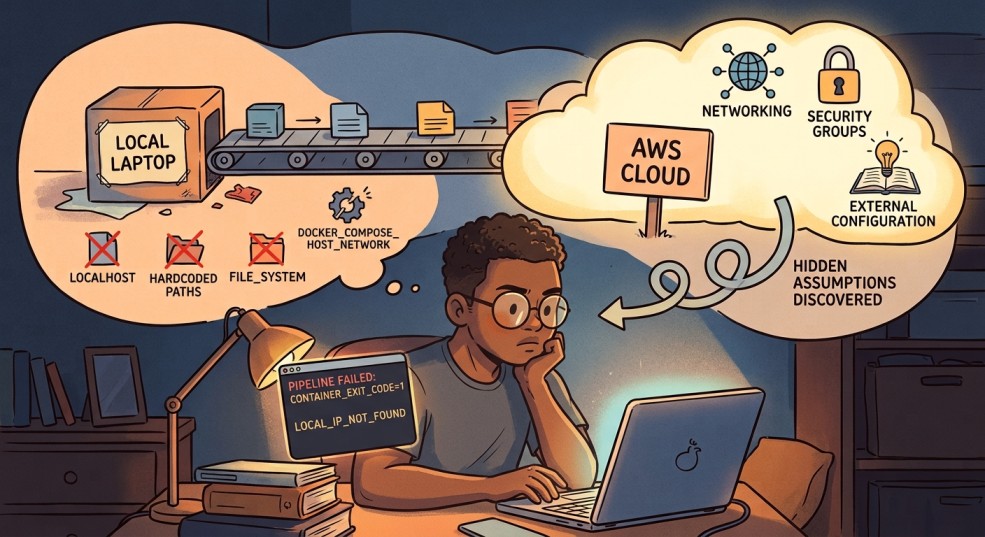
This article is about what happened when I tried to move it off my laptop and onto a real server, using nothing but the CLI. I expected the hard part to be AWS itself: accounts, instances, networking. It wasn’t. The hard part was everything I didn’t know I’d built on top of “it’s all running on the same machine.” That assumption was doing more work than I realized, and taking it away broke things one at a time, in ways that taught me more than the original build did.

Setting up the box

Getting a server running was, honestly, the easy part.

I created an AWS account on the newer $100-credit free tier, set up an IAM user for CLI work instead of using root (a small good habit that saved me from myself more than once), and launched a t3.small EC2 instance running Ubuntu 22.04.

A few small surprises came up along the way. Nothing major, but enough to remind me that a cloud server isn’t just my computer in a different location.

The default 8GB disk was too small before I’d even started. Resizing it meant running growpart and resize2fs, and the instructions I found online kept referencing a device called xvda. My instance didn’t have one. Newer instance types use the Nitro system, which names drives things like `nvme0n1` instead. Small naming difference, but it’s the kind of thing that makes you doubt everything else you’re about to type, since if the first command doesn’t even find its target, what else is going to quietly not apply.

I also saw the instance go “impaired” at one point while Kestra was pulling its Docker image for the first time. My best guess was that it had run out of memory. I added a 1GB swap file as a bit of extra breathing room, and it hasn’t happened since. Basically, it gives the system somewhere to offload memory when the RAM gets full, using disk space as a slower backup. It was a simple fix, but it was also my first reminder that a rented server doesn’t have quite the same headroom I’d gotten used to on my laptop.

I attached an Elastic IP so the server’s address wouldn’t change every time I stopped and started it, and locked down the security group so only my own IP could reach ports 22 (SSH), 8080 (Kestra’s UI), and 5432 (Postgres). That last part turned into its own minor recurring chore: my home internet doesn’t give me a fixed IP address, so most sessions started with me re-authorizing whatever address I currently had before anything else would even load.

None of this was hard. It was just a lot of small, specific facts about this particular kind of computer that nothing in my local setup had ever forced me to learn.

Getting the pipeline over

I installed Docker, brought over my project with rsync instead of git, since my repo is public and my .env file has real secrets in it, and ran docker compose up -d. Postgres came up healthy. Kestra came up too.

One thing caught me off guard here: Kestra’s flows don’t live in files that sync automatically when you copy a project over. They live inside Kestra’s own internal database. My one flow, fetch_rss, simply didn’t exist on the server until I pasted its YAML into the UI myself. It’s a small thing, but it’s the first hint of a pattern that showed up again and again during this whole process: things that felt like “my project” were actually split across two different kinds of state, files I own and copy around, and internal state that lives only inside the running system.

I clicked Execute. It failed immediately.

The toolbox that wasn’t there

My flow used a Process task runner for the actual work. It built the Python virtual environment, installed the dependencies, and ran my ETL script. That was exactly how I had it set up locally, and it had never caused me any problems.

The error was about a missing package: python3.12-venv. Digging in, I learned something I genuinely hadn’t considered. The Process task runner doesn’t run on the EC2 host. It runs inside Kestra’s own container. Kestra’s container had Python, but not the piece needed to build a virtual environment.

I fixed it temporarily by running apt-get install -y python3.12-venv directly inside the container. It worked, but I knew it wouldn’t survive a restart because the change wasn’t part of the image itself. I’d fixed the immediate problem, but not the underlying setup.

This is where I had to make a real decision, and it’s the first genuinely useful lesson from this whole project: the manager and the worker shouldn’t be the same thing. Kestra’s job is to decide when things run and keep track of them. It is not supposed to also be the thing building Python environments and installing packages by hand. Every time a task needed something new, I’d be rebuilding Kestra’s own image to fit, which is a strange amount of responsibility to hand to your orchestrator.

Instead of trying to keep patching Kestra itself, I moved the actual work out of it and switched the task to Kestra’s Docker task runner. The idea was pretty simple: Kestra would spin up a separate container just for the Python job, run the ETL script there, and get rid of the container when the job was done. It was closer to how I wanted the setup to work, although I was about to run into a few more complications.

Giving the manager a key it didn’t know it needed

For Kestra to launch a separate worker container, it needs to be able to talk to Docker itself, the actual daemon managing containers on the host. The way you grant that is by mounting the Docker socket into Kestra’s own container:

kestra:  volumes:    - /var/run/docker.sock:/var/run/docker.sock

This is worth sitting with for a second, because it’s not a neutral decision. Anything with access to that socket can effectively ask Docker to do anything on the host, including spinning up containers with far more access than they should have. Locally, on my own laptop, this never registered as a real tradeoff. On a machine sitting on the open internet, it’s a genuine one. I decided it was acceptable for a learning project running a single low-stakes flow, but it’s exactly the kind of decision that deserves to be made on purpose, not discovered by accident three steps into a debugging session.

With the socket mounted, I updated the flow to use the Docker task runner and pointed it at a python:3.12-slim image. First real test: Permission denied.

Turned out the socket being mounted wasn’t enough. Kestra’s own process inside the container wasn’t running as root, and that particular door only opens for root. Having the key isn’t the same as being allowed to use it.

Adding user: "0:0" to Kestra’s service definition fixed it, though not before I spent a confusing round-trip discovering that Docker Compose doesn’t always rebuild a container just because you changed a line in the file. docker compose up -d --force-recreate kestra was the command that actually made the change take effect. up -d alone quietly decided nothing important had changed.

The volume that wasn’t really there

With permissions sorted, the flow ran further, and hit a new wall: Could not open requirements file: No such file or directory.

I’d mounted my project folder into the worker container so it could see the script and its dependencies. I could prove the mount worked by running the exact same docker run command by hand, outside of Kestra, and it worked perfectly. Whatever Kestra was doing, it wasn’t the same thing.

This ended up being the longest detour in the whole project, and honestly, probably the one that annoyed me the most in hindsight. The worst part was how quietly it failed. I first tried a setting called volume-enabled, but I had it in the wrong part of the config. Then I tried again with the correct property name, volumeEnabled—no dash—and put it in the right place, under plugins.configurations, targeting the Docker task runner plugin by its full class name. Still nothing.

No error. No warning. Nothing. It just kept silently ignoring the setting.

Eventually, I found the real explanation: host-folder mounting for the Docker task runner appears to require Kestra’s Enterprise edition. I’d been chasing a setting that simply doesn’t work on the free tier I’m using. It wasn’t a typo or a misconfiguration. I was basically trying to open a door that I didn’t even know was locked. The frustrating part was that Kestra never made that clear—it just quietly ignored the setting and left me wondering what I was doing wrong.

I want to flag this specifically for anyone following a similar path: when a setting appears to do nothing no matter how correctly you write it, stop assuming you have the syntax wrong. Check whether the feature exists in the edition you’re actually running.

The way that’s actually meant to work

The fix wasn’t to force the mount to work. It was to stop trying to mount anything at all.

Kestra has a feature called Namespace Files, essentially a small file store that lives inside Kestra itself. You upload your project’s files into it once, and Kestra hands them to worker containers automatically at runtime, no host folder access required. It’s the fully-supported version of what I was trying to hack together with volumes.

Uploading them from the server turned into its own small chain of mistakes, which by this point in the day felt almost expected. I tried a PUT request first; Kestra wanted a POST with the file wrapped as multipart form data. I got that right and got back silence, no confirmation, no error, which I initially read as success. It wasn’t.

A curl -i flag to actually show me the response headers revealed the real problem: 401 Unauthorized. Basic auth had been on the whole time, my browser just never told me because it was already logged in. curl has no memory like that. Adding -u username:password to every request fixed it.

Once the files were uploading, I made a habit of checking each one immediately after, since one early batch attempt had somehow paired the wrong file sizes with the wrong filenames. Slower, but it meant every mismatch got caught the moment it happened instead of surfacing three steps later as a mysterious script error.

With all six files confirmed correct, I rewrote the flow to use `namespaceFiles: enabled: true` instead of a volume mount, and switched the file paths from absolute (`/workspace/python/…`) to relative (`python/…`), since Namespace Files land directly in the container’s working directory rather than wherever I’d been mounting things.

This time, it actually ran the script. Fetched 25 articles. Parsed them. And then:

psycopg.OperationalError: connection failed: connection to server at "127.0.0.1", port 5432 failed: Connection refused

The last assumption: localhost isn’t a place

This was the smallest fix of the whole day, and also the most honest one, in the sense that it exposed an assumption I’d never had reason to question before.

My database config had DB_HOST=localhost by default. And locally, that was perfectly fine. Everything was running on the same machine, so saying “the database is right here” was actually true.

But on AWS, Kestra’s worker was running in its own separate container. So when it tried to connect to localhost, it was basically looking inside its own little container and saying, “Where’s the database?” Postgres was sitting in a different container, one that it could reach through the shared Docker network using the service name postgres instead.

I passed the real connection details into the worker container as environment variables, matching them against the container network we’d set up earlier (networkMode: rss-pipeline_default, the same network Postgres and Kestra already shared), and the pipeline finally ran start to finish. Fetched articles, saved them, done.

The very last thing I fixed, immediately after, was the password sitting in plain text in that same config. Kestra has a KV store built for exactly this, a place to store a value once and reference it from the flow ({{ kv('DB_PASSWORD') }}) instead of writing it out anywhere. Small thing, but it felt like the right note to end on: getting something working and then immediately asking whether the way it’s working is one I’d be comfortable with someone else seeing.

What actually broke, and why it matters

Zooming out, every single failure in this process traced back to one of two things:

Things That Worked Locally but Broke Across Containers

“The database is on localhost”, “The Python environment I set up by hand is still here.”. Locally, being on the same machine does a lot of invisible work for you. You don’t think of those things as requirements because you never had to. They’re just there, and everything works. Once you move to separate containers, those assumptions disappear, and suddenly you realize how much you were relying on them without even noticing.

Things That Failed Silently Instead of Loudly.

A mistyped config property. A feature that doesn’t exist in the tier you’re running. An unauthenticated request that returns nothing instead of an error. None of these crashed anything. They just quietly did less than I asked, which is a much harder thing to debug than an actual crash, because there’s no stack trace pointing at the gap. You just have to notice that something didn’t happen.

If I had to compress this into one piece of advice for someone doing this for the first time: when something you built locally moves to a real server, treat every assumption about “things being in the same place” as a claim you need to re-prove, not a fact you get to keep. And when a fix seems to do nothing at all, however many times you double check the syntax, consider that it might genuinely be doing nothing, because the feature isn’t available to you in the first place.

What’s Next

The pipeline itself is done, running, and actually saving real data to a cloud database. That was the goal for this piece, and it’s genuinely satisfying to type that sentence after the day I just had.

I’ve been going back and forth on what comes after this. Part of me wants to finish the full loop, connect rss-transform, my dbt project, to this new cloud database, and close out the RSS pipeline as one complete, end-to-end story from raw feed to clean, tested data. There’s something appealing about that kind of closure.

But if I’m honest, this project has already taught me most of what it set out to teach me. I went from “what even is a Docker container” to debugging Docker socket permissions, silent config failures, and container networking, on a real server, with real consequences when I got something wrong. That was the whole point of picking this project in the first place, and at some point, squeezing more lessons out of the same pipeline starts to feel like staying somewhere past when I’ve actually outgrown it.

So I’m genuinely undecided, and I think that’s an honest place to leave this piece. Maybe the next article is the dbt-to-cloud connection, wrapping this series up properly. Maybe it’s something completely new, a fresh project, a different set of skills, a reason to feel like a beginner again in a new way. I don’t know yet, and I’d rather say that plainly than manufacture a tidy roadmap I’m not actually committed to.

Either way, I’ll be documenting it the same way I documented this: honestly, mistakes included.

This is part of my ongoing series documenting my transition from systems analyst to data engineer. If you’ve been following along, thank you.


Connect with me on LinkedInYouTube, and Twitter.

Shape
Shape
Stay Ahead

Explore More Insights

Stay ahead with more perspectives on cutting-edge power, infrastructure, energy,  bitcoin and AI solutions. Explore these articles to uncover strategies and insights shaping the future of industries.

Shape

Cisco bulks up its AI infrastructure portfolio with Supermicro’s liquid-cooled servers

“This expansion enables customers to easily manage complex, high-density AI clusters alongside non-AI workloads. Customers will also now be able to deploy rack-to-fabric liquid cooling, featuring Cisco liquid-cooled AI networking systems alongside Supermicro’s liquid-cooled servers. This unlocks trillion-parameter training and high-throughput inference use cases with platforms including Nvidia Vera Rubin NVL72 and Nvidia

Read More »

Taking your temperature from the inside

Oral and forehead thermometers may not accurately capture a person’s core body temperature, and the few ingestible temperature sensors on the market are so big they are hard to swallow and risk obstructing the GI tract. But MIT engineers created one that can send continuous temperature updates at a size

Read More »

Cisco taps Teleport for infrastructure identity management tech

Cisco is continuing to embed identity management capabilities deeper into its product portfolio by teaming with Teleport, a security vendor headquartered in Oakland, Calif., that’s focused on identity-based infrastructure access management. Cisco is investing in and partnering with Teleport as part of its efforts to bring infrastructure identity everywhere, Matt Caulfield,

Read More »

DOE and SBA Launch SBIC-E Initiative to Unleash Private Capital for American Innovation and Small Businesses

WASHINGTON—The U.S. Department of Energy (DOE) and the U.S. Small Business Administration (SBA) today signed a Memorandum of Agreement establishing the Small Business Investment Company-Energy (SBIC-E) Initiative, a new strategic partnership advancing President Trump’s commitment to supporting America’s small businesses, strengthening domestic manufacturing and supply chains, and ensuring the United States leads in the technologies critical to our national and economic security. The new SBIC-E Initiative brings together DOE’s scientific and technical expertise with SBA’s proven Small Business Investment Company (SBIC) Program, which currently has $58 billion in combined portfolio value. Since 1958, the SBIC Program has invested $147 billion in American small businesses, and since 1995, SBIC-backed businesses have created or supported 10.6 million jobs. “America’s small businesses drive American innovation and affordable, reliable energy access,” said U.S. Secretary of Energy Chris Wright. “By partnering with the Small Business Administration, the Energy Department is committing to invest its resources in American small businesses that will create jobs, strengthen our domestic manufacturing base, and unleash American energy production.” Through DOE’s Office of Technology Commercialization (OTC), the Department will identify strategic technology priorities, provide technical and commercialization expertise, and help engage the investment community. SBA, through its Office of Investment and Innovation, will administer the initiative and encourage the formation and growth of investment funds focused on those priorities. SBIC-E adds another tool to that effort by connecting innovators with private capital to help promising technologies grow, scale, and build here at home. “President Trump is establishing American energy dominance, ending the Green New Scam, and putting our nations’ producers and innovators back in control at the dawn of a new era of energy reliability and abundance,” said SBA Administrator Kelly Loeffler. “Through this partnership, the SBA and Department of Energy are strengthening access to capital in the private sector to

Read More »

Energy Department Announces $500 Million Award to Revitalize American Steelmaking

WASHINGTON—The U.S. Department of Energy (DOE) today announced a $500 million award to support a $1 billion investment at Cleveland-Cliffs’ Middletown Works facility in Middletown, Ohio. Vice President JD Vance and U.S. Energy Secretary Chris Wright visited Middletown Works today to highlight the Trump Administration’s commitment to American steelworkers and the resurgence of American manufacturing. The investment will modernize American steelmaking, protect 2,300 American jobs, and strengthen the domestic steel supply chain. The project advances President Trump’s commitment to put American workers first, bring investment back to American communities, and strengthen the industries critical to America’s economic and national security. Cleveland-Cliffs determined that the business case for the original project scope no longer made sense given customers’ unwillingness to pay a “green premium” for steel. Working with DOE, Cleveland-Cliffs identified a viable alternative that will upgrade and improve the efficiency of the existing coal-fired blast furnace while also capturing and commercializing co-product blast furnace gas (BFG). “President Trump is rebuilding America’s industrial base,” said Secretary Wright. “This investment puts American workers and American manufacturing first. It will modernize one of our nation’s critical steelmaking facilities, protect thousands of jobs, and strengthen our domestic steel production—keeping Ohio at the heart of American manufacturing and strengthening our national security.” The investment will modernize critical steelmaking operations at Middletown Works by rebuilding and upgrading the plant’s main coal-fired ironmaking furnace, deploying AI to optimize furnace operations and improve energy efficiency, and building an on-site facility to convert steel mill process gases into electricity. Follow-on investments will turn industrial byproducts into materials for concrete used in regional infrastructure. “This landmark investment at Middletown Works will secure a reliable domestic supply of high-purity steel while protecting thousands of quality jobs in Ohio,” said Assistant Secretary of Energy Audrey Robertson. “DOE is proud to partner with Cleveland-Cliffs to reduce America’s dependence on foreign products

Read More »

Energy Secretary Keeps Critical Generation Available in Mid-Atlantic

WASHINGTON—U.S. Secretary of Energy Chris Wright today issued an emergency order to address critical grid reliability issues facing the Mid-Atlantic region of the United States. The emergency order directs PJM Interconnection L.L.C. (PJM), in coordination with Constellation Energy Corporation, to ensure Units 3 and 4 of the Eddystone Generating Station in Pennsylvania remain available to operate and to employ economic dispatch to minimize costs for the American people. The units were originally slated to shut down on May 31, 2025. “The energy sources that perform when you need them most are the most valuable,” Secretary Wright said. “During recent Mid-Atlantic heat waves, coal, natural gas, and nuclear kept the lights and air conditioners on. President Trump and the Energy Department are committed to keeping critical generation available when demand is highest, reducing the risk of blackouts and ensuring Americans have affordable, reliable, and secure power—regardless of whether the wind is blowing or the sun is shining.” As outlined in DOE’s Resource Adequacy Report, power outages could increase by 100 times in 2030 if the U.S. continues to take reliable power offline. This order is in effect beginning on August 23, 2026, through November 20, 2026.                                                                                             ###

Read More »

Energy Department Announces $500 Million to Secure America’s Critical Mineral and Battery Supply Chains

WASHINGTON—The U.S. Department of Energy’s (DOE) Office of Critical Minerals and Energy Innovation (CMEI) today announced $500 million for seven selected projects to expand critical mineral and material processing, battery manufacturing, and recycling capacity in the United States. In accordance with President Trump’s Executive Order, Unleashing American Energy, the selected projects advance the President’s agenda to strengthen America’s domestic critical minerals and materials supply chains, reduce reliance on foreign sources, bolster national security, and advance American energy dominance. “For too long, America has depended on foreign actors for critical materials essential to modern life that underpin our economy, energy security, and national security,” said U.S. Secretary of Energy Chris Wright. “President Trump is reversing that dependence by securing our critical supply chains, unleashing American industry, and bringing critical materials production and processing back to the United States.” “DOE is taking decisive action to secure the critical supply chains necessary to power our nation,” said Assistant Secretary of Energy Audrey Robertson. “These projects underscore DOE’s commitment to driving innovation, reducing reliance on foreign sources, and promoting American energy dominance.” This is the third round of funding from DOE’s Battery Materials Processing and Battery Manufacturing and Recycling programs, which support battery materials processing, recycling, and manufacturing projects. These include demonstration projects, construction of commercial-scale facilities, and retrofitting or retooling existing facilities.  Critical minerals and materials are essential to American industry, energy production, and national security. Expanding domestic capacity will help ensure the resources America needs are processed, manufactured, and recycled in the United States.  Information on the selected projects is available here and here.

Read More »

bp lets Shah Deniz compression automation contract

bp has let a contract to Emerson to deliver automation technologies for the Shah Deniz Compression project offshore Azerbaijan. Emerson will provide integrated control and safety systems aimed at enhancing production, safety, and reliability on the new offshore compression platform. The contract includes systems to provide process control, safety shutdown, fire and gas detection, and power management. Together, these systems deliver real-time visibility and remote control of critical operations, Emerson said. The $2.9 billion Shah Deniz Compression project, which includes an electrically powered, normally unattended offshore production platform, is a next stage development of the Caspian Sea Shah Deniz field. Designed to access low-pressure gas reserves and maximize overall recovery, the platform will be equipped with four 11 Mw compressors and serve as the central compression hub for gas from the Shah Deniz Alpha and Bravo platforms. The platform will operate remotely from bp’s onshore Sangachal terminal 55 km south of Baku. The project is expected to enable about 50 billion cu m of additional gas and about 25 million bbl of condensate production and export. Construction is scheduled to be completed in 2029, with first gas compression expected from the Shah Deniz Alpha platform in 2029 and from the Shah Deniz Bravo platform in 2030. The agreement follows a previous automation contract bp signed with Emerson for the Azeri Central East and Shah Deniz Stage 2 developments. bp is operator at Shah Deniz (29.99%) with partners Lukoil (19.99%), TPAO (19%), Cenub Qaz Dehlizi (16.02%), NICO (10%), and MVM (5%).

Read More »

Federal court voids Texas GulfLink license over agency’s ‘serious procedural errors’

The ruling voids the license, halting all construction or progress. Sentinel Midstream declined comment on the ruling and would not answer questions about the status of construction. GulfLink, sited about 30 miles offshore Freeport, Tex., is designed to export up to 1 million b/d via Very Large Crude Carriers (VLCCs) to the government of Japan and Freeport Commodities. The project involves a 44-mile, 42-in. OD pipeline and was scheduled to begin operations around 2028. The estimated $2.1 billion investment was funded as part of a broader trade agreement between the US and Japan. The legal battle stems from a specific rule in the Deepwater Port Act of 1974 that dictates that the federal government can only permit one crude oil deepwater port, including any supporting infrastructure, within a single designated “application area.” Because the competing SPOT project’s pipeline route physically overlaps and intersects GulfLink’s lines, the plaintiff—Citizens for Clean Air & Clean Water in Brazoria County (Better Brazoria), represented by Earthjustice—successfully argued that MARAD violated the “one port” rule when issuing GulfLink’s license in February. The three-judge panel found that MARAD “improperly drew” the map designing the project’s official boundaries to exclude the pipelines and approved two overlapping projects in the same zone instead of only licensing one. The court wrote that the scope of the error made vacatur, not the less serious remand without vacatur, the appropriate remedy. Vacatur deems the license invalid and is used when the court finds “serious procedural errors” that cannot be easily explained or fixed with minor changes. Remand without vacatur sends the decision back to the agency for corrections but leaves the current license in place in the meantime. SPOT project status The $2.5-3-billion SPOT project, developed by Enterprise Products Partners in partnership with Enbridge Inc., also lies about 30 miles from Freeport. Designed to handle VLCCs,

Read More »

IBM unveils dual-architecture processor to run Arm-native apps on Z mainframes

“These caches have enormously low latency, and that is one of the key reasons and key engineering choices to support the performance and scalability of enterprise workloads, very data-intensive workloads like databases and transactions,” Jacobi said. “In addition, we have an on-chip data processing unit for IO acceleration and dedicated AI accelerators as well as accelerators for data compression, cryptography and data sorting.” One of the biggest takeaways from this processor announcement is that the enormous catalog of software already built for Arm becomes accessible on a mainframe without anyone having to port it first, notes Matt Kimball, senior datacenter analyst at Moor Insights & Strategy, in a research note about the news. Still, “this is a 2027 conversation, and with no date, supported software list, or Arm licensing treatment, the work now is inventory and scenario planning rather than financial modeling,” Kimball wrote.

Read More »

PJM’s New Data Center Power Equation

PJM Interconnection has now filed one of the most consequential proposed changes yet in the relationship between data centers and the electric grid. Rather than simply treating a new hyperscale or AI facility like any other customer whose demand will be backed through regional capacity procurement, PJM is proposing a framework under which the largest new loads would need to be supported by new capacity, have their needs covered through the Reliability Backstop Procurement, or face potential curtailment when the regional power system is short of supply. The approach has been developing since PJM launched its Critical Issue Fast Path process for large loads in 2025, but it became substantially more concrete in late July and August 2026. PJM filed its proposed Reliability Backstop Procurement with FERC on July 31 and began accepting applications that day for its FERC-approved Expedited Interconnection Track. On Aug. 13, PJM filed its proposed Interim Resource Adequacy Service, or IRAS, along with the Large Load Registry that would support it. The immediate numbers explain the urgency. PJM’s July 2026 capacity auction for the 2028/2029 delivery year procured 138,318 MW of unforced capacity through the centralized auction. Even after including Fixed Resource Requirement resources, however, PJM came up 6,831 MW short of its reliability requirement. The auction cleared at the FERC-approved $325/MW-day price cap. It was the second consecutive auction in which the PJM region failed to procure its full reliability requirement, something that had not happened before these two auctions. That gap is occurring while demand continues to accelerate. PJM’s 2026 long-term forecast projects summer peak demand growing at an average 3.6% annually over the next decade, compared with just 0.3% in the comparable forecast issued in 2021. Summer peak demand is projected to rise by nearly 66 GW over 10 years. Data centers are

Read More »

Zayo, NVIDIA Build the Long-Haul Backbone for Distributed AI

The data center industry’s increasingly power-first approach to site selection has created a follow-on question: Once the megawatts are found, is there enough network infrastructure to make the site useful at AI scale? Zayo and NVIDIA are putting real infrastructure behind that question. Zayo said it is working with NVIDIA to expand network capacity supporting AI factories across North America, including an 8,000-route-mile program targeting some of the fastest-growing AI corridors in the United States. The project encompasses six new long-haul routes along with overbuilds of existing network across 10 high-demand corridors. The announcement arrives as AI data center development moves beyond the largest established hubs toward markets where power and land may be more readily available, but fiber capacity cannot necessarily be taken for granted. That geography is increasingly important. NVIDIA has separately developed “scale-across” networking technology designed to allow AI infrastructure distributed among different buildings — or even data centers separated by hundreds of kilometers — to operate as a more unified computing environment. Put together, the developments suggest that networking is becoming inseparable from the AI factory buildout itself. Power may determine where the next generation of AI infrastructure can be built. Fiber will increasingly determine how effectively those sites can participate in the larger AI ecosystem. Fiber Follows the Power Zayo CEO Steve Smith said AI demand is changing both where network infrastructure is needed and how aggressively capacity must be deployed ahead of development. “AI is fundamentally reshaping where and how network infrastructure needs to be built across the U.S.,” Smith said. The company’s 8,000-mile program is more nuanced than that top-line number might suggest. Zayo disclosed in April that the expansion includes approximately 3,000 route miles across six new long-haul routes, plus more than 5,000 route miles of overbuilds across 10 existing corridors. Zayo

Read More »

Southern’s 17 GW Pipeline Puts AI Power Demand Into Utility Math

The headline number from Southern Company’s latest earnings report is hard to miss: electricity use by data centers across the utility’s system increased 55% in the second quarter compared with a year earlier. But the more consequential numbers may be the ones sitting behind it. Southern now has more than 1.2 GW of operating data center load, up by more than 500 MW from a year ago. At the same time, its electric utilities have signed contracts and large-load agreements totaling more than 17 GW by the mid-2030s, with another 8 GW in late-stage development and a prospective pipeline of large industrial and data center projects exceeding 75 GW. That leaves an enormous gap between the data center megawatts consuming electricity today and the load Southern has contractually positioned itself to serve during the next decade. For the data center industry, that gap may be the most important part of Southern’s second-quarter story. It offers a look at how utilities are beginning to convert the AI infrastructure boom from forecasts and campus announcements into contracts, generation procurement, transmission investment and eventually energized capacity. From Contracts to Megawatts Southern added roughly 6 GW of contracted large load during the quarter alone. Alabama Power signed three projects representing about 3 GW, while Georgia Power reached a 25-year agreement to serve OpenAI’s planned project in Effingham County near Savannah. That facility is expected to require approximately 3.2 GW and begin taking electric service in phases in 2028. The numbers nevertheless require an important distinction. Seventeen gigawatts contracted does not mean 17 GW will suddenly appear on Southern’s grid. Large data center campuses ramp gradually, often over several years, and Southern executives acknowledged that actual customer ramp schedules do not always match the assumptions made when projects are first approved. CEO Chris Womack said

Read More »

PORTS-Pike Takes Shape as an 8-GW AI Infrastructure Model

Back on March 31, 2026, we discussed we discussed SoftBank and SB Energy’s plans to redevelop the former Portsmouth Gaseous Diffusion Plant site near Piketon as a 10-GW artificial intelligence data center campus supported by almost an equal amount of new power generation. At the time, the plan called for as much as 10 GW of new generation, including 9.2 GW of natural gas capacity, along with approximately $4.2 billion of high-voltage transmission infrastructure developed with AEP Ohio. An initial 800-MW data center phase was targeted for service in 2028. The March story was notable because Pike County appeared to offer a preview of a new model for building hyperscale infrastructure: develop the generation, transmission and data center simultaneously rather than wait for an increasingly congested regional grid to deliver multiple gigawatts of capacity. Not to mention the reuse of a brownfield site with the encouragement of the federal government. Since then, almost every important part of the project has moved forward, and on August 17, the most consequential missing pieces fell into place. NVIDIA announced that it will become the exclusive AI compute infrastructure provider for the PORTS-Pike Technology Campus. OpenAI will be the data center customer, signing a 20-year lease with SB Energy for approximately 8 GW of IT capacity. NVIDIA will invest another $1.5 billion in SB Energy and provide credit support for the land, power and shell infrastructure behind an initial 4.25 GW of IT load, with an option covering approximately another 3.75 GW. The Securities and Exchange Commission filing accompanying the announcement makes the financial commitment even more significant. NVIDIA disclosed that its aggregate payment obligation associated with its initial commitment is capped at $105 billion. That is not a conventional capital commitment to spend $105 billion building the campus, nor is it simply a

Read More »

Nvidia scales back financing guarantee for OpenAI data center

Nvidia is scaling back a proposed financial guarantee tied to a massive OpenAI data center project in Ohio, reducing its initial commitment from as much as $250 billion to less than $120 billion, according to report in the Wall Street Journal. Earlier this month, Nvidia announced partnerships with major financial firms including Apollo Global Management, BlackRock, Blackstone, Brookfield Asset Management, Goldman Sachs and KKR, aimed at mobilizing more than $500 billion in capital for AI computing infrastructure. The change represents a significant restructuring of Nvidia’s role in financing the planned facility, which is being developed by SB Energy, a subsidiary of SoftBank. Under the revised arrangement, Nvidia would guarantee financing for the project’s first phase, representing roughly 5 gigawatts of capacity, or half of the total proposed capacity. Financing for the remaining capacity would be considered separately at a later stage.

Read More »

Microsoft will invest $80B in AI data centers in fiscal 2025

And Microsoft isn’t the only one that is ramping up its investments into AI-enabled data centers. Rival cloud service providers are all investing in either upgrading or opening new data centers to capture a larger chunk of business from developers and users of large language models (LLMs).  In a report published in October 2024, Bloomberg Intelligence estimated that demand for generative AI would push Microsoft, AWS, Google, Oracle, Meta, and Apple would between them devote $200 billion to capex in 2025, up from $110 billion in 2023. Microsoft is one of the biggest spenders, followed closely by Google and AWS, Bloomberg Intelligence said. Its estimate of Microsoft’s capital spending on AI, at $62.4 billion for calendar 2025, is lower than Smith’s claim that the company will invest $80 billion in the fiscal year to June 30, 2025. Both figures, though, are way higher than Microsoft’s 2020 capital expenditure of “just” $17.6 billion. The majority of the increased spending is tied to cloud services and the expansion of AI infrastructure needed to provide compute capacity for OpenAI workloads. Separately, last October Amazon CEO Andy Jassy said his company planned total capex spend of $75 billion in 2024 and even more in 2025, with much of it going to AWS, its cloud computing division.

Read More »

John Deere unveils more autonomous farm machines to address skill labor shortage

Join our daily and weekly newsletters for the latest updates and exclusive content on industry-leading AI coverage. Learn More Self-driving tractors might be the path to self-driving cars. John Deere has revealed a new line of autonomous machines and tech across agriculture, construction and commercial landscaping. The Moline, Illinois-based John Deere has been in business for 187 years, yet it’s been a regular as a non-tech company showing off technology at the big tech trade show in Las Vegas and is back at CES 2025 with more autonomous tractors and other vehicles. This is not something we usually cover, but John Deere has a lot of data that is interesting in the big picture of tech. The message from the company is that there aren’t enough skilled farm laborers to do the work that its customers need. It’s been a challenge for most of the last two decades, said Jahmy Hindman, CTO at John Deere, in a briefing. Much of the tech will come this fall and after that. He noted that the average farmer in the U.S. is over 58 and works 12 to 18 hours a day to grow food for us. And he said the American Farm Bureau Federation estimates there are roughly 2.4 million farm jobs that need to be filled annually; and the agricultural work force continues to shrink. (This is my hint to the anti-immigration crowd). John Deere’s autonomous 9RX Tractor. Farmers can oversee it using an app. While each of these industries experiences their own set of challenges, a commonality across all is skilled labor availability. In construction, about 80% percent of contractors struggle to find skilled labor. And in commercial landscaping, 86% of landscaping business owners can’t find labor to fill open positions, he said. “They have to figure out how to do

Read More »

2025 playbook for enterprise AI success, from agents to evals

Join our daily and weekly newsletters for the latest updates and exclusive content on industry-leading AI coverage. Learn More 2025 is poised to be a pivotal year for enterprise AI. The past year has seen rapid innovation, and this year will see the same. This has made it more critical than ever to revisit your AI strategy to stay competitive and create value for your customers. From scaling AI agents to optimizing costs, here are the five critical areas enterprises should prioritize for their AI strategy this year. 1. Agents: the next generation of automation AI agents are no longer theoretical. In 2025, they’re indispensable tools for enterprises looking to streamline operations and enhance customer interactions. Unlike traditional software, agents powered by large language models (LLMs) can make nuanced decisions, navigate complex multi-step tasks, and integrate seamlessly with tools and APIs. At the start of 2024, agents were not ready for prime time, making frustrating mistakes like hallucinating URLs. They started getting better as frontier large language models themselves improved. “Let me put it this way,” said Sam Witteveen, cofounder of Red Dragon, a company that develops agents for companies, and that recently reviewed the 48 agents it built last year. “Interestingly, the ones that we built at the start of the year, a lot of those worked way better at the end of the year just because the models got better.” Witteveen shared this in the video podcast we filmed to discuss these five big trends in detail. Models are getting better and hallucinating less, and they’re also being trained to do agentic tasks. Another feature that the model providers are researching is a way to use the LLM as a judge, and as models get cheaper (something we’ll cover below), companies can use three or more models to

Read More »

OpenAI’s red teaming innovations define new essentials for security leaders in the AI era

Join our daily and weekly newsletters for the latest updates and exclusive content on industry-leading AI coverage. Learn More OpenAI has taken a more aggressive approach to red teaming than its AI competitors, demonstrating its security teams’ advanced capabilities in two areas: multi-step reinforcement and external red teaming. OpenAI recently released two papers that set a new competitive standard for improving the quality, reliability and safety of AI models in these two techniques and more. The first paper, “OpenAI’s Approach to External Red Teaming for AI Models and Systems,” reports that specialized teams outside the company have proven effective in uncovering vulnerabilities that might otherwise have made it into a released model because in-house testing techniques may have missed them. In the second paper, “Diverse and Effective Red Teaming with Auto-Generated Rewards and Multi-Step Reinforcement Learning,” OpenAI introduces an automated framework that relies on iterative reinforcement learning to generate a broad spectrum of novel, wide-ranging attacks. Going all-in on red teaming pays practical, competitive dividends It’s encouraging to see competitive intensity in red teaming growing among AI companies. When Anthropic released its AI red team guidelines in June of last year, it joined AI providers including Google, Microsoft, Nvidia, OpenAI, and even the U.S.’s National Institute of Standards and Technology (NIST), which all had released red teaming frameworks. Investing heavily in red teaming yields tangible benefits for security leaders in any organization. OpenAI’s paper on external red teaming provides a detailed analysis of how the company strives to create specialized external teams that include cybersecurity and subject matter experts. The goal is to see if knowledgeable external teams can defeat models’ security perimeters and find gaps in their security, biases and controls that prompt-based testing couldn’t find. What makes OpenAI’s recent papers noteworthy is how well they define using human-in-the-middle

Read More »